Forum Discussion

 Microsoft
Filters Pane (Smartfilters) now available; plus new updates!
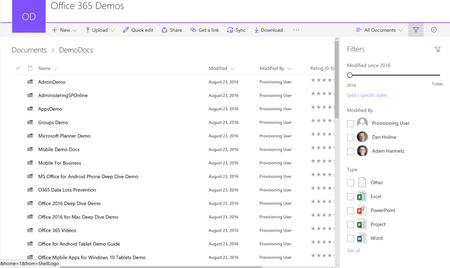

Hi @Miceile Barrett,
Super excited about the FIlters Pane, especially allowing for a tree format, this is what had been keeping me from shifting our company to the new document libraray experience (which I love).
I may, however, have stumbled upon a bug.
When using managed metadata, in Library Settings, in the meta data column, if I allow multiple values, it creates a problem for the filter pane. Namely, if I then select more than one check box in the filter pane for that managed metadata, it gives an error message. And a cryptic one at that: "The specified view is invalid. The specified view might have been deleted or you might not have permission to view it. Contact the site owner for more information."
Since I suspect this is something you are going to want to address, I will provide additional detail below, along with screenshots.
First, here is how it worked in the classic view. I enabled multiple values, created a document, and set the properties of the document to two values.
As you can see below, when, in the classic Smartfilters, I select the parent term it properly shows the item that has the related child terms.
Now, in your Filters Pane in the Modern Experience I was super excited the way you have the check boxes set up. I no longer would have to choose between viewing one child term or viewing all child terms (by selecting the parent term).
However, when viewing that library in the Modern Experience, when I check more than one box in that same metadata term set, I get the following error message.
Now if I go into the library setting for the column, and uncheck "Allow multiple values" like this:
And then go back to that same Filters Pane view, a voila, it works again, no error message.
I hope you can find a way to fix this is a way that still allows for us to use multiple values. After all, one of the big selling points for using SharePoint instead of a file share is that you can tag an item multple ways, so you no longer have to pick one folder to save a file in.
I also hope you can keep the check box format of the filters pane so that you could, say, check two child terms and just see the results of that. I was really excited to see the possibility of that in how you designed filter panes.
Feel free to contact me if I can be helpful in testing, etc.
 Sina JazayeriAug 22, 2018Copper Contributor
Hi, I'm setting up the same scenario as in your snapshot by the metadata in the filter cannot be collapsed. In your snapshot it seems you have the option of collapsing and expanding the terms. How did you set that up?
- Miceile BarrettJul 10, 2017
THANK YOU Thaddeus Ferber - we had not been able to repro this anywhere. Your detailed notes helped me get a repro and we have found the root cause of the bug. My team is working on the fix and it should be avaliable in production the last week of July.
- Thaddeus FerberJul 11, 2017Brass Contributor
Wonderful! You rock.
I am hoping your fix will still allow us to use the Filters Pane for columns that allow multiple values. And also that you keep the check box format of the filters pane so that you could, say, check two child terms and just see the results of that?
- Miceile BarrettJul 11, 2017
Correct - the fix will allows users to check multiple child terms without seeing the error.
