Forum Discussion

 Microsoft
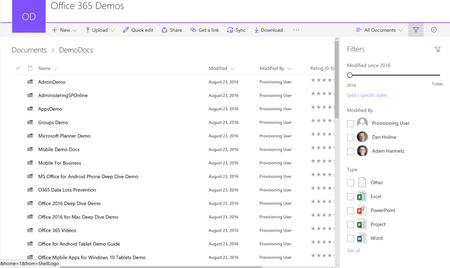
Filters Pane (Smartfilters) now available; plus new updates!
 Microsoft
I was able to repro the Enterprise Keyword issue to find the cause of the bug. We have a fix and it will be avaliable to everyone August 28.
Thanks for helping us fix this :)

Hi Miceile, just a quick feedback- its working! Thank you and your team!
P.S. Is there a way to apply AND in a filter, not OR? I.e. filter to a narrower subset of documents that include both keyword 1 and keyword 2
I am having issues with filtering based on a managed metadata column though. If I select a term that has no sub-terms it is working fine, once I get to a sub-term though the filtering breaks and shows me items that do not have the selected metadata.
Managed metadata column
- Miceile BarrettSep 05, 2017Hi Nils,
To answer your PS: If I understand the question correctly then we do support this functionality. The filters pane works as an AND command across different columns. For example, if you filter by the user that modified a file and a specific date, we will only show items modified by that person on that exact date.
For your bug, my team and I are still not able to get a repro of this. The breadcrumb on your screen shot is only showing one filter, but the filters pane is showing two items selected. Are there any other details about this column that you can tell me? Did you use column header filtering to get this screen shot? Thaddeus FerberSep 05, 2017Brass Contributor
I realized (by trial and error) that the way it was set up is that when you are picking multiple values within a column, it treats them as OR statement, but when you are picking values from multiple columns it treats it as an AND statement. Probably a good thing to make sure is covered with in the documentation (if it isn't already), so people realize that this is how it is set up.
- Nils HempelSep 06, 2017Brass Contributor
This is what I was looking for in my earlier question. What I am looking for is to cumulate enterprise keywords.
I.e. I have a document library in which each document is tagged with a number of enterprise keywords that let me know what general topics they're about. Often I want to see only documents that contain keyword 1 AND keyword 2, thus severly narrowing down the number of documents I see. Right now I have to manually scroll down and individually pick the documents that I contain both keywords. I've already found that I've overlooked some doucments that way.
In other words- I would love to have a default OR filter as it is right now but get the option of an AND filter when filtering within the same column.
- Joe FedorowiczSep 05, 2017Iron ContributorThis is not working for me on my tenants. Has it been fully rolled out?
- Miceile BarrettSep 05, 2017
It has been fully rolled out. Joe Fedorowicz are you seeing any version of the filters pane?
- Joe FedorowiczSep 05, 2017Iron Contributor
When I select a value to filter, it gives me this response:
"We didn't find anything to show here. Remove filters to see your items."
Which is untrue. If I set it using the old method it works just fine.
