Forum Discussion

Hammad Hassan Khan
May 08, 2018Tin Contributor
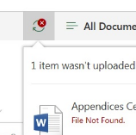
File not found error while trying to upload a file to a sharepoint site library
I have been recently getting the following error while trying to upload a file to a SP site library. "File not found". It pops up after I upload the file. Any help in this matter would be greatly ap...
 DeletedMay 08, 2018
Please try below steps
- Navigate to the Library settings
- Click Manage files which have no checked in version
- go and checkin in all the files
- Delete everything at %USERPROFILE%\AppData\Local\Microsoft\WebsiteCache
- Delete everything at %APPDATA%\Microsoft\Web Server Extensions\Cache
If it still doesn't work try to update your file name and re upload.
Deleted
May 08, 2018Not applicable
Please try below steps
- Navigate to the Library settings
- Click Manage files which have no checked in version
- go and checkin in all the files
- Delete everything at %USERPROFILE%\AppData\Local\Microsoft\WebsiteCache
- Delete everything at %APPDATA%\Microsoft\Web Server Extensions\Cache
If it still doesn't work try to update your file name and re upload.

Russell Griffith
May 09, 2018Copper Contributor
I'm having the exact same issue only in the modern browser view. When I switch to classic view this works fine. I emptied both cache folders and had no unchecked in items. Any other thoughts? I've tried this in all browsers with the exact same result.