Forum Discussion

Error when saving properties even if filled out
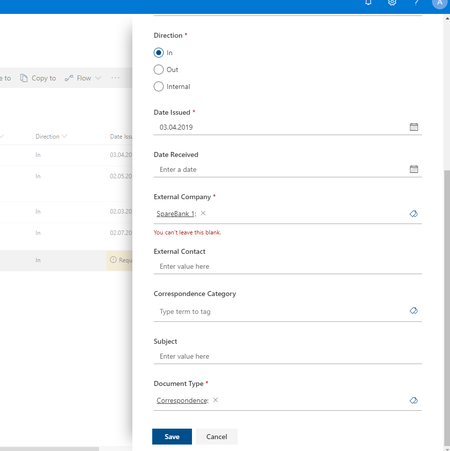

I checked today (1st May 2019) and this issue seems to have been resolved. Is everyone else finding this is the case?
Regards,
AJ
 Swapna NethiJun 03, 2020Copper Contributor
- Carry4IT MegensMar 10, 2021Brass ContributorWe have the same issue in a SharePoint Online based Document Management System that has a set of required managed metadata properties. It looks if the value is there, yet the system complains with message: You can't leave this blank.
The issue does not occur in Classic SharePoint.
The issue does not occur when using the File--> Info --> Properties in Word app.
The root cause of this is unclear to me. We have filed a Microsoft Premire Support ticket on this.- Tony BROOKSJun 01, 2021Tin Contributor
Hello Carry4IT Megens did Premier Support provide a solution, I am seeing the same problem, but not if save the file as Rich Text Format. But even if I save that file into the same (new SharePoint online library) as .docx the managed metadata column will not save changes. Another interesting fact: There is another managed metadata column using the same term set, changes to that column do save!?!?!
Clearing 'custom XML' as explained here, https://techcommunity.microsoft.com/t5/sharepoint/document-column-metadata-not-saving/m-p/1309256, did not work. Note, this particular file has been migrated from a SharePoint 2010 library to SharePoint online (but other files in the same library do not have this problem).
 Dominik_NMay 03, 2019Copper Contributor
ashokjingar i can also confirm that the issue no longer persists for my customer. Great :-)
- Swapna NethiJun 02, 2020Copper Contributor
- Frank-Ove KristiansenMay 02, 2019Brass Contributor
I tried recreating the issue today, but was unable to. So it might seem that this has been fixed.

