Forum Discussion

Frank-Ove
Apr 03, 2019Tin Contributor
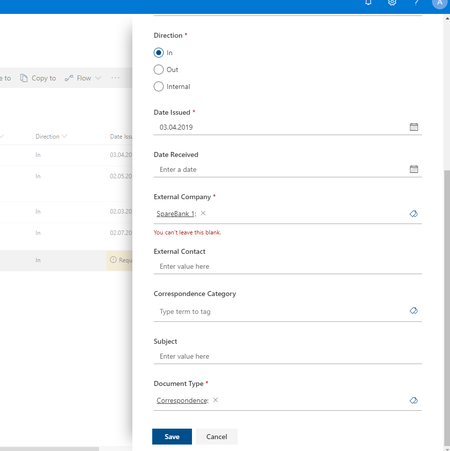
Error when saving properties even if filled out
Hi all, I just discovered something that might be a bug. I have a document library with some custom columns. One column is of type Managed Metadata, and set to be Required. Column name is Ext...

NThoman
Jan 19, 2022Iron Contributor
This seems to be an issue if the metadata field name had a space in it. When creating new fields don't add any spaces at first. Then go back and rename the file with the space in it after. This should fix your saving issues. It's an annoying bug that has existed for years.... really can't believe MS hasn't fix it yet.

Carry4IT Megens
Jan 19, 2022Brass Contributor
Too late, fields have been created in the past with spaces in them and now used in 50k document or so. So going back is not an option, would you agree?
But those fields are technically renamed under the hood, like "Published_x0020_Version" or "Publishing_x0020_Date" so no more space involved.
I suspect the issue also has to do with multi valued managed metadata fields.
But those fields are technically renamed under the hood, like "Published_x0020_Version" or "Publishing_x0020_Date" so no more space involved.
I suspect the issue also has to do with multi valued managed metadata fields.
- NThomanJan 19, 2022Iron ContributorThe bug is in Office and the Property Pane. It also has issues if special characters are used in the field name. It has nothing to do with the multi value type. My suggestion to you is to create a new field with the same name just no spaces.... use Power Automate to copy the value over from the broken field to the new one. Then delete the old one out of the content type and list. Then update the name. It's annoying but the only solution if you want people adding metadata through the Office Desktop App with the least resistance.
Unspoken rules of SharePoint:
1) Never create sites or columns with Spaces... rename them after.
2) Never use special characters like \ or - in the field names.... Office cant use them as linked Quick Parts if you do.- Carry4IT MegensJan 19, 2022Brass ContributorThanks for the quick reply. Aww, no! Why does Microsoft always make things so difficult. Do not allow spaces. Period. But no, sir, now halfway somewhere things break...