Forum Discussion

Enterprise wiki site collection template which work on the new experience (modern interface)
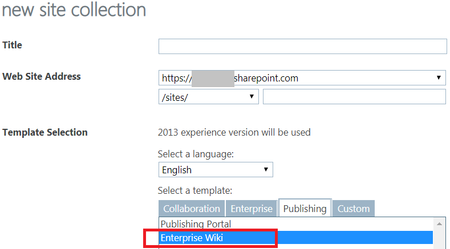


Ok thanks for the detailed reply. I think i will test your appraoch. as seems using the old/traditional enterprise wiki site collection will not have any future improvement.
 Rachel_DavisMay 22, 2019Steel ContributorWiki PAGES will not have any future improvement, but if you use MODERN pages - even on a traditional site, the vast majority of the new features will work. Certainly the things that Susan and I have mentioned will work. We have thousands of traditional sites and subsites. We are not migrating them to new Team or Communication sites. But we are modernizing them by using modern pages, etc.
Migrating is a pain as it means directing users to a new URL and breaking any links or bookmarks that come to the existing site. I would just rebuild your existing site with modern pages. You can build the modern pages in the background and simply not put out the navigation link until you're ready. When you're ready, rename the existing home page "home-OLD", then name your new modern page as home.aspx and set as the site home page. Voila!
Then, when user goes to their existing bookmark for the home page to your site, it will still work. As will any links that other people have made to your site.
You'll have to decide how to handle all the old wiki pages and that may depend on how many there are. Maybe you- Susan_HanleyMay 22, 2019MVPI would still recommend converting the site to a modern site, but it is a choice, as you suggest. My general feeling is that you want to bite the bullet and upgrade wherever possible. It may be painful for a short time, but I think it creates a more future-proof environment.
- Rachel_DavisMay 22, 2019Steel Contributor
Susan_Hanley I have yet to have anyone give me a good business justification for going through the pain and expense of migrating a classic site to a communication site. A group enabled Team site is one thing, but not a communication site. The functionality is almost identical, certainly for what this guy is asking about. I would argue that a classic site has MORE options for list types than a communication site which is limited to a custom list and an event list.
If you have solid functional reasons for migrating my classic sites to a communication site, I'd love to hear them and take them back to my IT. But for now, if I can do all the things you talk about on my current site without the pain of migrating, why should I do it or put my users through that hassle?