Forum Discussion

Enabling attachments in a forms library item to open in sharepoint instead of downloading
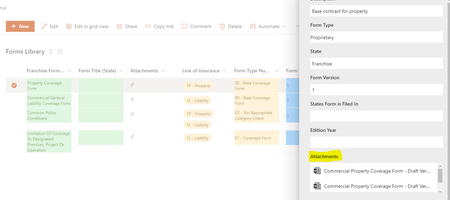

Upload the document to a SharePoint document library.
Copy the URL of the document. You can do this by selecting the document in the library and clicking on the "Copy link" option in the "Share" menu.
Open the list item to which you want to attach the document, and click on the "Attach File" button.
In the "Attach File" dialog, paste the URL of the document in the "File name" field.
Remove the beginning of the URL, up to and including the SharePoint domain name. For example, if the URL is "https://contoso.sharepoint.com/sites/TeamSite/Documents/Document1.docx", remove "https://contoso.sharepoint.com/".
Add the text "ms-word:ofe|u|" before the remaining part of the URL, like this: "ms-word:ofe|u|/sites/TeamSite/Documents/Document1.docx".
Click "OK" to attach the document to the list item.
 ARippyMar 09, 2023Copper Contributor
Hi jaortizgolf78. Thanks for the reply! When I get to step seven and click "open" (There is no okay button) I get an error message saying the path is not valid.
This is the text I entered : ms-word:ofe|u|/sites/esBOPBlueSkyers/Shared%20Documents/03.%20BDX%20Team/04.Property/Form%20Drafts/Test.docx?d=w39bbc6a6d6e640328931833e6d5382ab&csf=1&web=1&e=gT3knt
Did I miss something?