Forum Discussion

Sarah_Morse
Jun 01, 2022Tin Contributor
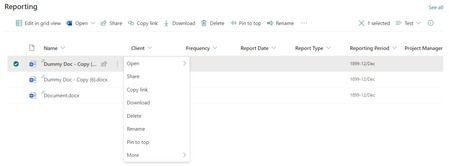
"Edit" document Properties not showing in library web part
I added a document library web part on a page but "Properties" is not displaying as an option in the file menu. Users upload their documents straight to the library web part, but SharePoint Online no...

ganeshsanap
Jun 02, 2022MVP
Sarah_Morse This is the default behavior of SharePoint document library web part and you cannot change that.
However, as a workaround you can create a link to properties form using JSON formatting in SharePoint.
Example:
{
  "$schema": "https://developer.microsoft.com/json-schemas/sp/v2/column-formatting.schema.json",
  "elmType": "a",
  "txtContent": "Edit Properties",
  "attributes": {
    "href": "=@currentWeb + '/Shared Documents/Forms/EditForm.aspx?ID=' + [$ID]",
	"target": "_blank"
  }
}
where Shared Documents is the name of document library (in library URL). You can add this JSON on any column in your library (or create a new column in library & add the JSON).
Output:
Please click Mark as Best Response & Like if my post helped you to solve your issue. This will help others to find the correct solution easily. It also closes the item. If the post was useful in other ways, please consider giving it Like.