Forum Discussion

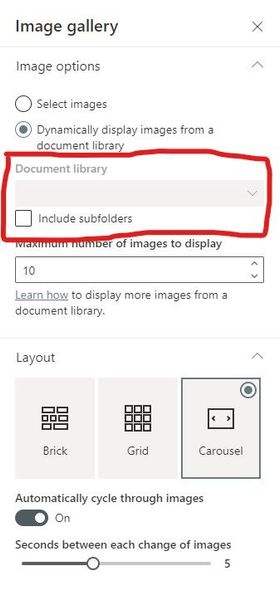
Document Library greyed out on Image Gallery web part
- Aug 04, 2021
I too have seen this behavior on my SharePoint site and I think this is a bug in SharePoint code (API call) which retrieves document libraries from current site to bind to the dropdown control.
I noticed below error in developer console of browser when I selected Dynamically display images from a document library option in web part settings:
The expression "Id,Title,RootFolder%2FServerRelativeUrl" is not valid.& the API call request causing this error is:
https://<tenant>.sharepoint.com/sites/<siteName>/_api/web/lists?%24select=Id%2CTitle%2CRootFolder%252FServerRelativeUrl&%24filter=BaseTemplate+eq+101&%24orderby=Title+asc&%24expand=RootFolderBut, ideally it should be like:
https://<tenant>.sharepoint.com/sites/<siteName>/_api/web/lists?$select=Id,Title,RootFolder,ServerRelativeUrl&$filter=BaseTemplate eq 101&$orderby=Title asc&$expand=RootFolderHope it will help you & Microsoft to troubleshoot this issue.
Please click Mark as Best Response & Like if my post helped you to solve your issue. This will help others to find the correct solution easily. It also closes the item. If the post was useful in other ways, please consider giving it Like.


Hi gregbutler_20 , no I have not. As far as I'm concerned, ganeshsanap has diagnosed this one correctly and the problem is at Microsoft's end and needs a fix there.
