Forum Discussion

Document Library - New Default File Types
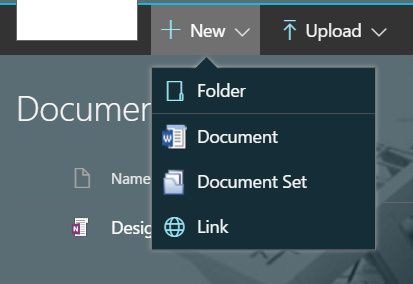
- Mar 30, 2017Updated: That looks like a customised look and feel you have there but shouldn't affect the functionality. You probably have "manage content types" enabled for that library so you won't be able to edit the template url. In that case edit the customized Document content type (click on link in the Content Types section of the Library Settings page. In Content Type settings go to Advanced Settings and remove the document template from there.

Yes, the way you have set this up is that the content type has just a word template, so that is the only document type you will be offered.
Assuming you didn't want a template, just a blank document, you can fix it by going to list settings and in "Advanced" you should see the Document Template section has a Template URL input box. If you delete the template link, you should be able to get the full list of documents when you go back to the New link.
Depending on the situation it might be safer and easier to just create a new document library if that's an option.
If you actually want a template then you will need to start adding more templates for the different types, or create more content types.
- ReubenMar 30, 2017Iron Contributor
Well this is interesting..... if I go to another document library I can actually edit the template file.....
- Bill_Ayers1Mar 30, 2017MVPUpdated: That looks like a customised look and feel you have there but shouldn't affect the functionality. You probably have "manage content types" enabled for that library so you won't be able to edit the template url. In that case edit the customized Document content type (click on link in the Content Types section of the Library Settings page. In Content Type settings go to Advanced Settings and remove the document template from there.
- ReubenMar 30, 2017Iron Contributor
That worked!
I guess I should avoid having "Manage Content Types" checked off when creating a new Document Library.
- ReubenMar 30, 2017Iron Contributor
Thanks for your help!
This is what I see when I go to "Advanced Settings"
Since it is 'greyed out' I can't delete what is there. I don't think this is a permissions issue because I had my full Admin try to change it and she couldn't either.
- Mar 29, 2017You are not seeing the experience of creating files using Office Online because you have added custom content types to your document library
- Bill_Ayers1Mar 29, 2017MVPNot me, Juan Carlos; it's Reuben who is having the problem :-)
- Mar 29, 2017Yeap Bill, sorry if you understood I have referring to you ;-)

