Forum Discussion

Document approval from Approve/Reject - how to see who approved?
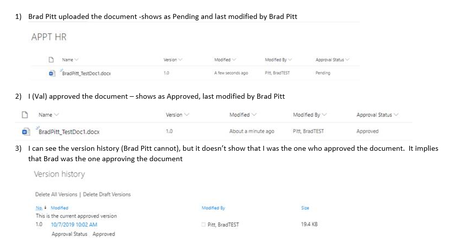

SinhaKislay this is not part of a workflow - I am simply approving the document by navigating to approve/reject. I don't see any tasks (but I am not expecting to as I have not triggered a workflow)

ValSwift Have you found a solution for this? I would also like to see who approved in SharePoint. It is visible in Teams though.
Thank you
 eguvenDec 06, 2021Copper ContributorNow I'm at the same point and wondering if you found a solution.
- EmfreeDec 06, 2021Copper Contributor
Hi eguven
No, unfortunately, I haven't found a solution in SP - I reference emails and Approvals in Teams.
Regards- RobElliottDec 06, 2021Silver Contributor
Emfree When I need to multiple approvals I do it via a flow in Power Automate with a parallel branch for each approver. The SharePoint list/library has columns for each approver name, date and comments. Inside each branch is the start and wait for an approval action and the update item action which updates appropriate columns in the list/library when theoutcome is known. So who has approved or rejected gets saved with the comments from each one.
Rob
Los Gallardos
Microsoft Power Automate Community Super User
