Forum Discussion

Custom Template in SharePoint
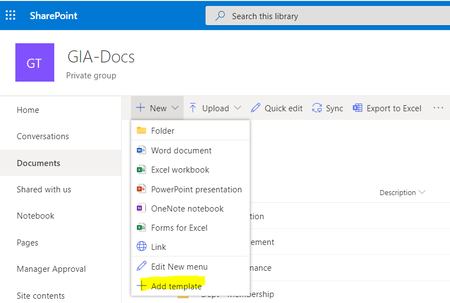

If they are creating or editing documents, then definitely, they'll need something above Read or View.
You should be able to give them Contribute rights. It's legacy SharePoint, but effectively that will allow them to create and edit documents, but it will give them read only to the library and site (they cannot edit either of these).
If you want them to create and not edit for any reason, you'll need to create a custom permission level.

daytamod I did not want users to create folder / files on 1st two level, so they have view only permission. At level 3 I've given them read/write permissions. I've checked using tempalte with 'Contribute' permission on the library, it works but then it takes away the control to stop users creating files and folders on the root.
Secondly, is there any way through which we can create Deptt specific templates, for instance HR templates should be accessible to HR team only.
 MattWearmouthDec 16, 2021Copper ContributorDid you get to the bottom of this? I’m in the same situation.
- daytamodAug 03, 2020Copper Contributor
Syed_Sohail Following on from my previous comments on Document Sets, creating a library for each department and giving them exclusive permissions and templates is the easiest and most obvious, but I am assuming this is not feasible otherwise you would have done it. 😄
- MattWearmouthDec 16, 2021Copper ContributorDid you get to the bottom of this? I’m in the same situation
- daytamodAug 03, 2020Copper Contributor
Syed_Sohail "I did not want users to create folder / files on 1st two level, so they have view only permission. At level 3 I've given them read/write permissions. I've checked using tempalte with 'Contribute' permission on the library, it works but then it takes away the control to stop users creating files and folders on the root."
OK, I "believe you only want users to have permission to use a "specific" template at third level within their own folder allocated to them. User permissions can only be assigned to "Sites", "Lists" and "Items" (folders are items) but not to content types or templates. If you set permissions to a folder, it is either all templates in the library or no templates.
I think what you need for your solution is "Document Sets." Document Sets are content types that act like super folders. Once a document set "item" is created, you can assign user permissions to them. So you can have one document set for HR, and one for Finance, etc. and you can created them in advance and stop the users creating their own. But the clever thing is document sets allow you to specify which content types and templates are allowed in each. You will need to create a document set content type for each department, and within each, you choose which template(s) it will allow. You then create one document set in the library for each department using the departments content type. The users will only see the template(s) you allow them to choose from, and they can only be created from within that particular document set.
Does this sound like what you are looking for?