Forum Discussion

Conditional Formatting to show multiple hyperlinks on one field
 Sep 06, 2021
Jose Zaldivar it was jaxkookie that provided the code sample!
jaxkookie you are a legend - thank you so much!
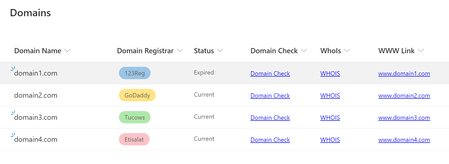
I have taken what you provided and used it to provide an 'Actions' menu with all the required functions. A sample of how it looks is attached.
For anyone else looking to use this sample full instructions below:
- Create a blank list
- Populate it with some sample data (domain names in the title field e.g. example.com)
- Add a new column of type 'Single line of text' (I think the column type is largely irrelevant) and call it 'Actions'
- Drop down the heading on the new actions menu and select 'Column settings' > 'Format this column'
- Switch to 'advanced mode'
- Paste in the following code:
{ "$schema":"https://developer.microsoft.com/json-schemas/sp/v2/column-formatting.schema.json", "elmType":"div", "style":{ "font-size":"18pt" }, "attributes":{ "iconName":"MoreVertical" }, "customCardProps":{ "formatter":{ "elmType":"div", "children":[ { "elmType":"div", "children":[ { "elmType":"div", "style":{ "padding":"5px 25px 5px 5px" }, "children":[ { "elmType":"div", "children":[ { "elmType":"div", "style":{ "font-size":"18px", "font-weight":"550", "text-align":"center", "margin-bottom":"10px" }, "txtContent":"Actions" } ] }, { "elmType":"div", "children":[ { "elmType":"span", "style":{ "font-size":"16px", "font-weight":"600", "padding-left":"5px" }, "attributes":{ "iconName":"CheckList" } }, { "elmType":"a", "style":{ "padding-left":"9px", "border":"none", "background-color":"transparent", "cursor":"pointer", "text-decoration":"none" }, "attributes":{ "target":"_blank", "href":"='https://www.mxtoolbox.com/domain/' + [$Title]", "title":"='Open domain check for ' + [$Title] + ' in a new window.'" }, "txtContent":"Domain Check" } ] }, { "elmType":"div", "style":{ "font-size":"10px", "font-weight":"600", "text-align":"center", "margin":"4px", "padding":"5px" }, "txtContent":"" }, { "elmType":"div", "children":[ { "elmType":"span", "style":{ "font-size":"16px", "font-weight":"600", "padding-left":"5px" }, "attributes":{ "iconName":"SearchIssue" } }, { "elmType":"a", "style":{ "padding-left":"9px", "border":"none", "background-color":"transparent", "cursor":"pointer", "text-decoration":"none" }, "attributes":{ "target":"_blank", "href":"='https://who.is/whois/' + [$Title]", "title":"='Open who is check for ' + [$Title] + ' in a new window.'" }, "txtContent":"Who Is Check" } ] }, { "elmType":"div", "style":{ "font-size":"10px", "font-weight":"600", "text-align":"center", "margin":"4px", "padding":"5px" }, "txtContent":"" }, { "elmType":"div", "children":[ { "elmType":"span", "style":{ "font-size":"16px", "font-weight":"600", "padding-left":"5px" }, "attributes":{ "iconName":"Link" } }, { "elmType":"a", "style":{ "padding-left":"9px", "border":"none", "background-color":"transparent", "cursor":"pointer", "text-decoration":"none" }, "attributes":{ "target":"_blank", "href":"='https://www.' + [$Title]", "title":"='Open https://www.' + [$Title] + ' in a new window.'" }, "txtContent":"='www.' + [$Title]" } ] }, { "elmType":"div", "style":{ "font-size":"10px", "font-weight":"600", "text-align":"center", "margin":"4px", "padding":"5px" }, "txtContent":"" }, { "elmType":"div", "children":[ { "elmType":"span", "style":{ "font-size":"16px", "font-weight":"600", "padding-left":"5px" }, "attributes":{ "iconName":"Link" } }, { "elmType":"a", "style":{ "padding-left":"9px", "border":"none", "background-color":"transparent", "cursor":"pointer", "text-decoration":"none" }, "attributes":{ "target":"_blank", "href":"='https://' + [$Title]", "title":"='Open https://' + [$Title] + ' in a new window.'" }, "txtContent":"[$Title]" } ] }, { "elmType":"div", "style":{ "font-size":"10px", "font-weight":"600", "text-align":"center", "margin":"4px", "padding":"5px" }, "txtContent":"" } ] } ] } ] }, "openOnEvent":"hover", "directionalHint":"bottomCenter", "isBeakVisible":true } }Click Save.
You should now see the three dots menu on the actions column.
Hovering should bring up the menu.


Jose Zaldivar it was jaxkookie that provided the code sample!
jaxkookie you are a legend - thank you so much!
I have taken what you provided and used it to provide an 'Actions' menu with all the required functions. A sample of how it looks is attached.
For anyone else looking to use this sample full instructions below:
- Create a blank list
- Populate it with some sample data (domain names in the title field e.g. example.com)
- Add a new column of type 'Single line of text' (I think the column type is largely irrelevant) and call it 'Actions'
- Drop down the heading on the new actions menu and select 'Column settings' > 'Format this column'
- Switch to 'advanced mode'
- Paste in the following code:
{
"$schema":"https://developer.microsoft.com/json-schemas/sp/v2/column-formatting.schema.json",
"elmType":"div",
"style":{
"font-size":"18pt"
},
"attributes":{
"iconName":"MoreVertical"
},
"customCardProps":{
"formatter":{
"elmType":"div",
"children":[
{
"elmType":"div",
"children":[
{
"elmType":"div",
"style":{
"padding":"5px 25px 5px 5px"
},
"children":[
{
"elmType":"div",
"children":[
{
"elmType":"div",
"style":{
"font-size":"18px",
"font-weight":"550",
"text-align":"center",
"margin-bottom":"10px"
},
"txtContent":"Actions"
}
]
},
{
"elmType":"div",
"children":[
{
"elmType":"span",
"style":{
"font-size":"16px",
"font-weight":"600",
"padding-left":"5px"
},
"attributes":{
"iconName":"CheckList"
}
},
{
"elmType":"a",
"style":{
"padding-left":"9px",
"border":"none",
"background-color":"transparent",
"cursor":"pointer",
"text-decoration":"none"
},
"attributes":{
"target":"_blank",
"href":"='https://www.mxtoolbox.com/domain/' + [$Title]",
"title":"='Open domain check for ' + [$Title] + ' in a new window.'"
},
"txtContent":"Domain Check"
}
]
},
{
"elmType":"div",
"style":{
"font-size":"10px",
"font-weight":"600",
"text-align":"center",
"margin":"4px",
"padding":"5px"
},
"txtContent":""
},
{
"elmType":"div",
"children":[
{
"elmType":"span",
"style":{
"font-size":"16px",
"font-weight":"600",
"padding-left":"5px"
},
"attributes":{
"iconName":"SearchIssue"
}
},
{
"elmType":"a",
"style":{
"padding-left":"9px",
"border":"none",
"background-color":"transparent",
"cursor":"pointer",
"text-decoration":"none"
},
"attributes":{
"target":"_blank",
"href":"='https://who.is/whois/' + [$Title]",
"title":"='Open who is check for ' + [$Title] + ' in a new window.'"
},
"txtContent":"Who Is Check"
}
]
},
{
"elmType":"div",
"style":{
"font-size":"10px",
"font-weight":"600",
"text-align":"center",
"margin":"4px",
"padding":"5px"
},
"txtContent":""
},
{
"elmType":"div",
"children":[
{
"elmType":"span",
"style":{
"font-size":"16px",
"font-weight":"600",
"padding-left":"5px"
},
"attributes":{
"iconName":"Link"
}
},
{
"elmType":"a",
"style":{
"padding-left":"9px",
"border":"none",
"background-color":"transparent",
"cursor":"pointer",
"text-decoration":"none"
},
"attributes":{
"target":"_blank",
"href":"='https://www.' + [$Title]",
"title":"='Open https://www.' + [$Title] + ' in a new window.'"
},
"txtContent":"='www.' + [$Title]"
}
]
},
{
"elmType":"div",
"style":{
"font-size":"10px",
"font-weight":"600",
"text-align":"center",
"margin":"4px",
"padding":"5px"
},
"txtContent":""
},
{
"elmType":"div",
"children":[
{
"elmType":"span",
"style":{
"font-size":"16px",
"font-weight":"600",
"padding-left":"5px"
},
"attributes":{
"iconName":"Link"
}
},
{
"elmType":"a",
"style":{
"padding-left":"9px",
"border":"none",
"background-color":"transparent",
"cursor":"pointer",
"text-decoration":"none"
},
"attributes":{
"target":"_blank",
"href":"='https://' + [$Title]",
"title":"='Open https://' + [$Title] + ' in a new window.'"
},
"txtContent":"[$Title]"
}
]
},
{
"elmType":"div",
"style":{
"font-size":"10px",
"font-weight":"600",
"text-align":"center",
"margin":"4px",
"padding":"5px"
},
"txtContent":""
}
]
}
]
}
]
},
"openOnEvent":"hover",
"directionalHint":"bottomCenter",
"isBeakVisible":true
}
}Click Save.
You should now see the three dots menu on the actions column.
Hovering should bring up the menu.
 jaxkookieSep 07, 2021Copper Contributor
Alex Lush , great job on the write-up. For my menu, I made a few more tweaks to replicate the title menu look and feel. by promoting the title field without links, I was able to reproduce the title field with links. I did this to save real estate, then I only needed one column. I am also grabbing the item ID without the ID column visible in the view using the [$FileRef], and a couple of substring formulas. The last piece I need to make this a cookie-cutter solution is a way to dynamically get the list guid.
{ "$schema": "https://developer.microsoft.com/json-schemas/sp/v2/column-formatting.schema.json", "elmType": "div", "style": { "font-size": "10pt", "color": "#2c2a29" }, "txtContent": "@currentField", "children": [ { "elmType": "div", "style": { "color": "#2c2a29" } }, { "elmType": "a", "style": { "white-space": "nowrap", "overflow": "hidden", "text-overflow": "ellipsis", "background-color": "transparent", "cursor": "pointer", "text-decoration": "none", "color": "#2c2a29" } }, { "elmType": "div", "style": { "color": "#2c2a29" } }, { "elmType": "span", "style": { "font-size": "16pt", "display": "flex", "height": "100%", "flex-wrap": "nowrap", "justify-content": "center", "align-items": "center" }, "attributes": { "iconName": "MoreVertical", "class": "ms-bgColor-gray50--hover", "title": "Show Actions" } } ], "customCardProps": { "formatter": { "elmType": "div", "children": [ { "elmType": "div", "style": { "border": "1px solid #002855" }, "children": [ { "elmType": "div", "children": [ { "elmType": "div", "children": [ { "elmType": "div", "style": { "font-size": "12pt", "color": "#ffffff", "font-weight": "600", "text-align": "center", "padding-bottom": "5px", "margin-bottom": "5px", "border-bottom": "1px solid #002855", "background-color": "#002855" }, "txtContent": "Item Menu" } ] }, { "elmType": "div", "style": { "padding": "5px 5px 5px 5px", "margin": "5px 5px 5px 5px" }, "attributes": { "class": "ms-bgColor-success--hover ms-fontColor-black--hover" }, "children": [ { "elmType": "span", "style": { "font-weight": "600", "padding-left": "5px" }, "attributes": { "iconName": "OpenFile" } }, { "elmType": "span", "style": { "padding": "9px 4px 6px 9px", "border": "none", "background-color": "transparent", "cursor": "pointer", "text-decoration": "none", "color": "#2c2a29" }, "customRowAction": { "action": "defaultClick" }, "attributes": { "title": "Open Item" }, "txtContent": "Open" } ] }, { "elmType": "div", "style": { "padding": "5px 5px 5px 5px", "margin": "5px 5px 5px 5px" }, "attributes": { "class": "ms-bgColor-success--hover ms-fontColor-black--hover" }, "children": [ { "elmType": "span", "style": { "font-weight": "600", "padding-left": "5px" }, "attributes": { "iconName": "Edit" } }, { "elmType": "span", "style": { "padding-left": "9px", "border": "none", "background-color": "transparent", "cursor": "pointer", "text-decoration": "none", "color": "#2c2a29" }, "customRowAction": { "action": "editProps" }, "attributes": { "title": "Edit item" }, "txtContent": "Edit" } ] }, { "elmType": "div", "style": { "padding": "5px 5px 5px 5px", "margin": "5px 5px 5px 5px", "border-bottom": "1px solid #c0c0c0" }, "attributes": { "class": "ms-bgColor-success--hover ms-fontColor-black--hover" }, "children": [ { "elmType": "span", "style": { "font-weight": "600", "padding-left": "5px" }, "attributes": { "iconName": "History" } }, { "elmType": "a", "style": { "padding-left": "9px", "border": "none", "background-color": "transparent", "cursor": "pointer", "text-decoration": "none", "color": "#2c2a29" }, "attributes": { "target": "_blank", "href": "=@currentWeb + '/_layouts/15/versions.aspx?List=' + '%7B4d95007f-f5ae-4988-b1d9-24b78eed12b7%7D' + '&ID=' + substring([$FileRef],lastIndexOf([$FileRef],'/')+1,indexOf([$FileRef],'_'))", "title": "Version History" }, "txtContent": "Version history" } ] }, { "elmType": "div", "style": { "padding": "5px 5px 5px 5px", "margin": "5px 5px 5px 5px" }, "attributes": { "class": "ms-bgColor-success--hover ms-fontColor-black--hover" }, "children": [ { "elmType": "span", "style": { "font-weight": "600", "padding-left": "5px" }, "attributes": { "iconName": "AlarmClock" } }, { "elmType": "a", "style": { "padding-left": "9px", "border": "none", "background-color": "transparent", "cursor": "pointer", "text-decoration": "none", "color": "#2c2a29" }, "attributes": { "target": "_blank", "href": "=@currentWeb + '/_layouts/15/SubNew.aspx?List=%7B4d95007f-f5ae-4988-b1d9-24b78eed12b7%7D&ID=' + substring([$FileRef],lastIndexOf([$FileRef],'/')+1,indexOf([$FileRef],'_'))", "title": "Alert me" }, "txtContent": "Alert" } ] }, { "elmType": "div", "style": { "padding": "5px 5px 5px 5px", "margin": "5px 5px 5px 5px", "border-bottom": "1px solid #c0c0c0" }, "attributes": { "class": "ms-bgColor-success--hover ms-fontColor-black--hover" }, "children": [ { "elmType": "span", "style": { "font-weight": "600", "padding-left": "5px" }, "attributes": { "iconName": "WorkFlow" } }, { "elmType": "a", "style": { "padding-left": "9px", "border": "none", "background-color": "transparent", "cursor": "pointer", "text-decoration": "none", "color": "#2c2a29" }, "attributes": { "target": "_blank", "href": "=@currentWeb + '/_layouts/15/workflow.aspx?List=%7B4d95007f-f5ae-4988-b1d9-24b78eed12b7%7D&ID=' + substring([$FileRef],lastIndexOf([$FileRef],'/')+1,indexOf([$FileRef],'_'))", "title": "Workflows" }, "txtContent": "Workflows" } ] }, { "elmType": "div", "style": { "padding": "5px 5px 5px 5px", "margin": "5px 5px 5px 5px" }, "attributes": { "class": "ms-bgColor-success--hover ms-fontColor-black--hover" }, "children": [ { "elmType": "span", "style": { "font-weight": "600", "padding-left": "5px" }, "attributes": { "iconName": "PageList" } }, { "elmType": "a", "style": { "padding-left": "9px", "border": "none", "background-color": "transparent", "cursor": "pointer", "text-decoration": "none", "color": "#2c2a29" }, "attributes": { "target": "_blank", "href": "=substring([$FileRef],0,lastIndexOf([$FileRef],'/'))", "title": "Default View" }, "txtContent": "View" } ] }, { "elmType": "div", "style": { "font-size": "10px", "font-weight": "600", "text-align": "center", "margin": "4px", "padding": "5px" }, "txtContent": "" } ] } ] } ] }, "openOnEvent": "hover", "directionalHint": "bottomCenter", "isBeakVisible": true, "beakStyle": { "backgroundColor": "#002855" } } }

