Forum Discussion

Conditional Formatting to show multiple hyperlinks on one field
 Sep 06, 2021
Jose Zaldivar it was jaxkookie that provided the code sample!
jaxkookie you are a legend - thank you so much!
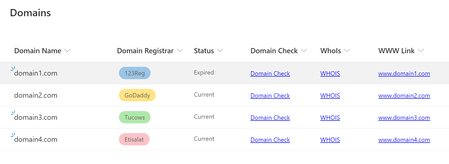
I have taken what you provided and used it to provide an 'Actions' menu with all the required functions. A sample of how it looks is attached.
For anyone else looking to use this sample full instructions below:
- Create a blank list
- Populate it with some sample data (domain names in the title field e.g. example.com)
- Add a new column of type 'Single line of text' (I think the column type is largely irrelevant) and call it 'Actions'
- Drop down the heading on the new actions menu and select 'Column settings' > 'Format this column'
- Switch to 'advanced mode'
- Paste in the following code:
{ "$schema":"https://developer.microsoft.com/json-schemas/sp/v2/column-formatting.schema.json", "elmType":"div", "style":{ "font-size":"18pt" }, "attributes":{ "iconName":"MoreVertical" }, "customCardProps":{ "formatter":{ "elmType":"div", "children":[ { "elmType":"div", "children":[ { "elmType":"div", "style":{ "padding":"5px 25px 5px 5px" }, "children":[ { "elmType":"div", "children":[ { "elmType":"div", "style":{ "font-size":"18px", "font-weight":"550", "text-align":"center", "margin-bottom":"10px" }, "txtContent":"Actions" } ] }, { "elmType":"div", "children":[ { "elmType":"span", "style":{ "font-size":"16px", "font-weight":"600", "padding-left":"5px" }, "attributes":{ "iconName":"CheckList" } }, { "elmType":"a", "style":{ "padding-left":"9px", "border":"none", "background-color":"transparent", "cursor":"pointer", "text-decoration":"none" }, "attributes":{ "target":"_blank", "href":"='https://www.mxtoolbox.com/domain/' + [$Title]", "title":"='Open domain check for ' + [$Title] + ' in a new window.'" }, "txtContent":"Domain Check" } ] }, { "elmType":"div", "style":{ "font-size":"10px", "font-weight":"600", "text-align":"center", "margin":"4px", "padding":"5px" }, "txtContent":"" }, { "elmType":"div", "children":[ { "elmType":"span", "style":{ "font-size":"16px", "font-weight":"600", "padding-left":"5px" }, "attributes":{ "iconName":"SearchIssue" } }, { "elmType":"a", "style":{ "padding-left":"9px", "border":"none", "background-color":"transparent", "cursor":"pointer", "text-decoration":"none" }, "attributes":{ "target":"_blank", "href":"='https://who.is/whois/' + [$Title]", "title":"='Open who is check for ' + [$Title] + ' in a new window.'" }, "txtContent":"Who Is Check" } ] }, { "elmType":"div", "style":{ "font-size":"10px", "font-weight":"600", "text-align":"center", "margin":"4px", "padding":"5px" }, "txtContent":"" }, { "elmType":"div", "children":[ { "elmType":"span", "style":{ "font-size":"16px", "font-weight":"600", "padding-left":"5px" }, "attributes":{ "iconName":"Link" } }, { "elmType":"a", "style":{ "padding-left":"9px", "border":"none", "background-color":"transparent", "cursor":"pointer", "text-decoration":"none" }, "attributes":{ "target":"_blank", "href":"='https://www.' + [$Title]", "title":"='Open https://www.' + [$Title] + ' in a new window.'" }, "txtContent":"='www.' + [$Title]" } ] }, { "elmType":"div", "style":{ "font-size":"10px", "font-weight":"600", "text-align":"center", "margin":"4px", "padding":"5px" }, "txtContent":"" }, { "elmType":"div", "children":[ { "elmType":"span", "style":{ "font-size":"16px", "font-weight":"600", "padding-left":"5px" }, "attributes":{ "iconName":"Link" } }, { "elmType":"a", "style":{ "padding-left":"9px", "border":"none", "background-color":"transparent", "cursor":"pointer", "text-decoration":"none" }, "attributes":{ "target":"_blank", "href":"='https://' + [$Title]", "title":"='Open https://' + [$Title] + ' in a new window.'" }, "txtContent":"[$Title]" } ] }, { "elmType":"div", "style":{ "font-size":"10px", "font-weight":"600", "text-align":"center", "margin":"4px", "padding":"5px" }, "txtContent":"" } ] } ] } ] }, "openOnEvent":"hover", "directionalHint":"bottomCenter", "isBeakVisible":true } }Click Save.
You should now see the three dots menu on the actions column.
Hovering should bring up the menu.


Alex Lush did resolve this issue?
Jose Zaldivar Unfortunately not, I am still using separate columns for each link.
 jaxkookieAug 31, 2021Copper Contributor
Alex Lush if you are still interested, I have somewhat resolved this issue. stealing the hovercard from @chrisKent I was able to modify and create a context menu that contains links and row action, on-hover of a vertical ellipse. let me know if this works for you.
{ "$schema":"https://developer.microsoft.com/json-schemas/sp/v2/column-formatting.schema.json", "elmType":"div", "style":{ "font-size":"18pt" }, "attributes":{ "iconName":"MoreVertical" }, "customCardProps":{ "formatter":{ "elmType":"div", "children":[ { "elmType":"div", "children":[ { "elmType":"div", "style":{ "padding":"5px 25px 5px 5px" }, "children":[ { "elmType":"div", "children":[ { "elmType":"div", "style":{ "font-size":"18px", "font-weight":"550", "text-align":"center", "margin-bottom":"10px" }, "txtContent":"Item Menu" } ] }, { "elmType":"div", "children":[ { "elmType":"span", "style":{ "font-size":"16px", "font-weight":"600", "padding-left":"5px" }, "attributes":{ "iconName":"OpenFile" } }, { "elmType":"span", "style":{ "padding-left":"9px", "border":"none", "background-color":"transparent", "cursor":"pointer", "text-decoration":"none" }, "customRowAction":{ "action":"defaultClick" }, "attributes":{ "class":"ms-fontColor-themePrimary ms-fontColor-themeDark--hover", "title":"Open Item" }, "txtContent":"Open" } ] }, { "elmType":"div", "style":{ "font-size":"10px", "font-weight":"600", "text-align":"center", "margin":"4px", "padding":"5px" }, "txtContent":"" }, { "elmType":"div", "children":[ { "elmType":"span", "style":{ "font-size":"16px", "font-weight":"600", "padding-left":"5px" }, "attributes":{ "iconName":"Edit" } }, { "elmType":"span", "style":{ "padding-left":"9px", "border":"none", "background-color":"transparent", "cursor":"pointer", "text-decoration":"none" }, "customRowAction":{ "action":"editProps" }, "attributes":{ "class":"ms-fontColor-themePrimary ms-fontColor-themeDark--hover", "title":"Edit item" }, "txtContent":"Edit" } ] }, { "elmType":"div", "style":{ "font-size":"10px", "font-weight":"600", "text-align":"center", "margin":"4px", "padding":"5px" }, "txtContent":"" }, { "elmType":"div", "children":[ { "elmType":"span", "style":{ "font-size":"16px", "font-weight":"600", "padding-left":"5px" }, "attributes":{ "iconName":"History" } }, { "elmType":"a", "style":{ "padding-left":"9px", "border":"none", "background-color":"transparent", "cursor":"pointer", "text-decoration":"none" }, "attributes":{ "target":"_blank", "href":"=@currentWeb + '/_layouts/15/versions.aspx?List=%7B1f03e51f-cd77-4d41-97b0-cf9de163f72b%7D&ID=' + [$ID]", "title":"Version History" }, "txtContent":"Version history" } ] }, { "elmType":"div", "style":{ "font-size":"10px", "font-weight":"600", "text-align":"center", "margin":"4px", "padding":"5px" }, "txtContent":"" }, { "elmType":"div", "children":[ { "elmType":"span", "style":{ "font-size":"16px", "font-weight":"600", "padding-left":"5px" }, "attributes":{ "iconName":"AlarmClock" } }, { "elmType":"a", "style":{ "padding-left":"9px", "border":"none", "background-color":"transparent", "cursor":"pointer", "text-decoration":"none" }, "attributes":{ "target":"_blank", "href":"=@currentWeb + '/_layouts/15/SubNew.aspx?List=%7B1f03e51f-cd77-4d41-97b0-cf9de163f72b%7D&ID=' + [$ID]", "title":"Alert me" }, "txtContent":"Alert" } ] }, { "elmType":"div", "style":{ "font-size":"10px", "font-weight":"600", "text-align":"center", "margin":"4px", "padding":"5px" }, "txtContent":"" }, { "elmType":"div", "children":[ { "elmType":"span", "style":{ "font-size":"16px", "font-weight":"600", "padding-left":"5px" }, "attributes":{ "iconName":"WorkFlow" } }, { "elmType":"a", "style":{ "padding-left":"9px", "border":"none", "background-color":"transparent", "cursor":"pointer", "text-decoration":"none" }, "attributes":{ "target":"_blank", "href":"=@currentWeb + '/_layouts/15/workflow.aspx?List=%7B1f03e51f-cd77-4d41-97b0-cf9de163f72b%7D&ID=' + [$ID]", "title":"Workflows" }, "txtContent":"Workflows" } ] }, { "elmType":"div", "style":{ "font-size":"10px", "font-weight":"600", "text-align":"center", "margin":"4px", "padding":"5px" }, "txtContent":"" } ] } ] } ] }, "openOnEvent":"hover", "directionalHint":"bottomCenter", "isBeakVisible":true } }- Jose ZaldivarAug 31, 2021Brass ContributorThank you Alex, any chance you can post a screenshot of how it looks like now? This is very useful. I will share this tip.
- Alex LushSep 06, 2021Iron Contributor
Jose Zaldivar it was jaxkookie that provided the code sample!
jaxkookie you are a legend - thank you so much!
I have taken what you provided and used it to provide an 'Actions' menu with all the required functions. A sample of how it looks is attached.
For anyone else looking to use this sample full instructions below:
- Create a blank list
- Populate it with some sample data (domain names in the title field e.g. example.com)
- Add a new column of type 'Single line of text' (I think the column type is largely irrelevant) and call it 'Actions'
- Drop down the heading on the new actions menu and select 'Column settings' > 'Format this column'
- Switch to 'advanced mode'
- Paste in the following code:
{ "$schema":"https://developer.microsoft.com/json-schemas/sp/v2/column-formatting.schema.json", "elmType":"div", "style":{ "font-size":"18pt" }, "attributes":{ "iconName":"MoreVertical" }, "customCardProps":{ "formatter":{ "elmType":"div", "children":[ { "elmType":"div", "children":[ { "elmType":"div", "style":{ "padding":"5px 25px 5px 5px" }, "children":[ { "elmType":"div", "children":[ { "elmType":"div", "style":{ "font-size":"18px", "font-weight":"550", "text-align":"center", "margin-bottom":"10px" }, "txtContent":"Actions" } ] }, { "elmType":"div", "children":[ { "elmType":"span", "style":{ "font-size":"16px", "font-weight":"600", "padding-left":"5px" }, "attributes":{ "iconName":"CheckList" } }, { "elmType":"a", "style":{ "padding-left":"9px", "border":"none", "background-color":"transparent", "cursor":"pointer", "text-decoration":"none" }, "attributes":{ "target":"_blank", "href":"='https://www.mxtoolbox.com/domain/' + [$Title]", "title":"='Open domain check for ' + [$Title] + ' in a new window.'" }, "txtContent":"Domain Check" } ] }, { "elmType":"div", "style":{ "font-size":"10px", "font-weight":"600", "text-align":"center", "margin":"4px", "padding":"5px" }, "txtContent":"" }, { "elmType":"div", "children":[ { "elmType":"span", "style":{ "font-size":"16px", "font-weight":"600", "padding-left":"5px" }, "attributes":{ "iconName":"SearchIssue" } }, { "elmType":"a", "style":{ "padding-left":"9px", "border":"none", "background-color":"transparent", "cursor":"pointer", "text-decoration":"none" }, "attributes":{ "target":"_blank", "href":"='https://who.is/whois/' + [$Title]", "title":"='Open who is check for ' + [$Title] + ' in a new window.'" }, "txtContent":"Who Is Check" } ] }, { "elmType":"div", "style":{ "font-size":"10px", "font-weight":"600", "text-align":"center", "margin":"4px", "padding":"5px" }, "txtContent":"" }, { "elmType":"div", "children":[ { "elmType":"span", "style":{ "font-size":"16px", "font-weight":"600", "padding-left":"5px" }, "attributes":{ "iconName":"Link" } }, { "elmType":"a", "style":{ "padding-left":"9px", "border":"none", "background-color":"transparent", "cursor":"pointer", "text-decoration":"none" }, "attributes":{ "target":"_blank", "href":"='https://www.' + [$Title]", "title":"='Open https://www.' + [$Title] + ' in a new window.'" }, "txtContent":"='www.' + [$Title]" } ] }, { "elmType":"div", "style":{ "font-size":"10px", "font-weight":"600", "text-align":"center", "margin":"4px", "padding":"5px" }, "txtContent":"" }, { "elmType":"div", "children":[ { "elmType":"span", "style":{ "font-size":"16px", "font-weight":"600", "padding-left":"5px" }, "attributes":{ "iconName":"Link" } }, { "elmType":"a", "style":{ "padding-left":"9px", "border":"none", "background-color":"transparent", "cursor":"pointer", "text-decoration":"none" }, "attributes":{ "target":"_blank", "href":"='https://' + [$Title]", "title":"='Open https://' + [$Title] + ' in a new window.'" }, "txtContent":"[$Title]" } ] }, { "elmType":"div", "style":{ "font-size":"10px", "font-weight":"600", "text-align":"center", "margin":"4px", "padding":"5px" }, "txtContent":"" } ] } ] } ] }, "openOnEvent":"hover", "directionalHint":"bottomCenter", "isBeakVisible":true } }Click Save.
You should now see the three dots menu on the actions column.
Hovering should bring up the menu.