Forum Discussion

Comment formatting in MS List/SharePoint List
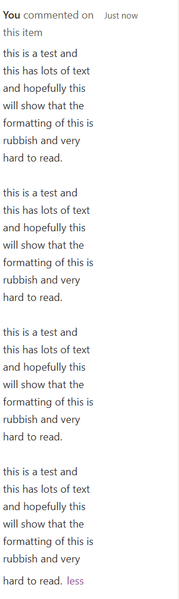
- May 20, 2026
Microsoft is rolling out UI changes across Teams and SharePoint, and during these rollouts you may see weird, inconsistent, or half‑baked UI behavior. It seems like a UI glitch related to Microsoft’s ongoing SharePoint design rollout, and we expect it will be corrected once the update fully propagates.
For safekeeping, could you please raise a support ticket with Microsoft from your tenant as well? This will help ensure the issue is properly tracked and investigated on their side.
If my post solved your issue or answered your query, please mark it as a Solution and give it a Like.

Could you please try using this same formatting in another list? If you are not facing the issue there, then please try the following steps:
- Change the Comments column temporarily to Plain text
- Save
- Change it back to Rich text
This forces SharePoint to rebuild the field rendering.
However, could you please share the JSON formatting you have used? I can test it in my tenant and let you know how it behaves for me.
 Barking_MadMay 20, 2026Tin Contributor
This is the built in comments section in the form view, it's not a column - how do i change the formatting on that? Im not aware I can? It sems to be happening across all my MS Lists
- virendrakMay 20, 2026Steel Contributor
Microsoft is rolling out UI changes across Teams and SharePoint, and during these rollouts you may see weird, inconsistent, or half‑baked UI behavior. It seems like a UI glitch related to Microsoft’s ongoing SharePoint design rollout, and we expect it will be corrected once the update fully propagates.
For safekeeping, could you please raise a support ticket with Microsoft from your tenant as well? This will help ensure the issue is properly tracked and investigated on their side.
If my post solved your issue or answered your query, please mark it as a Solution and give it a Like.