Forum Discussion

Vicgbt
Oct 01, 2021Copper Contributor
Column calculated from other existing columns
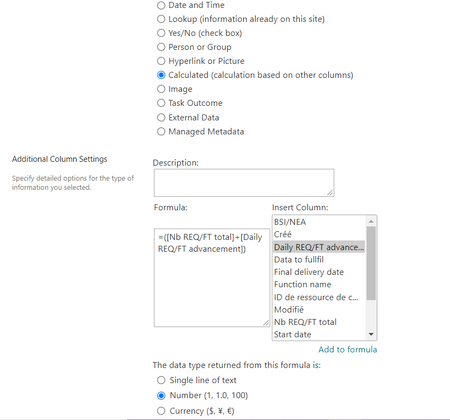
Hello, I am very annoyed : I have a SharePoint list and I would like to get a calculated column whose content adds that of two other columns already existing in my list. But when I select a c...

RobElliott
Oct 01, 2021Silver Contributor
Vicgbt what column type are those 2 other columns in your list?
Rob
Los Gallardos
Intranet, SharePoint and Power Platform Manager (and classic 1967 Morris Traveller driver)

Vicgbt
Oct 02, 2021Copper Contributor
- gretchunkimOct 02, 2021Brass ContributorIs the column itself is a calculated column? I see the column of interest here is called "Daily REQ/ FT Advance...", and that lead me to assume that is the case.
From my experience, you can work around it by creating a new calculated column type using the column name (eg., =[$missingcolumn] in the formula. Then use this column in the secondary calculation.
Good luck!- VicgbtOct 03, 2021Copper Contributor
No it's not a calculated column, it's only a number that I entered myself
Thank you, I will try your solution then
- RobElliottOct 04, 2021Silver Contributor
Vicgbt go into your list settings, select each of the columns and check what the internal name is at the end of the address bar after Field=. If you have changed the name of a column the original internal name will stay the same, and this might be the cause of your problem. It is the internal name that needs to be used in your calculated column.
Rob
Los Gallardos
Intranet, SharePoint and Power Platform Manager (and classic 1967 Morris Traveller driver)
