Forum Discussion

Bhavpreet Bains
May 10, 2019Iron Contributor
Can't edit List items in modern page
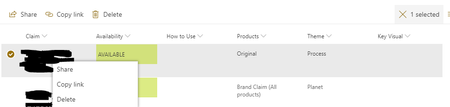
Hello, I noticed there is no option to edit the item after adding list webpart to a modern page. New Item can be added but edit provide share, copy link and delete option only. The o...

Bhavpreet Bains
May 10, 2019Iron Contributor
Can you also try adding the list as webpart to a modern page and then check?

Erik Wettergren
May 10, 2019Iron Contributor
HI again, I obviously didn't read your first post thouroughly. I have now tested it using a webpart to display one of my lists and I can confirm that I get the exact same fly menu as you with only "share", "copy link" and "delete". However in the SharePoint app on my iOS device, I can still edit individual items (but this time the link is displayed top left instead of top right)
- Bhavpreet BainsMay 10, 2019Iron ContributorFor mobile version, are you using the list or page to access? If page, I am seeing almost similar options available as in browser. However, if I access it using list, I am not sure how to access the different views.
- Erik WettergrenMay 10, 2019Iron ContributorWell, if I access the list "as a list" in the sharepoint app, then I get the edit link top right and if I access it through the page (in a webpart) then I get the "edit all" link top left. That's the only noticable difference I can see.