mobile
226 Topics
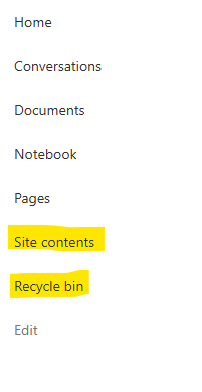
Recycle Bin and Site Content Hidden for Site Members and Site Visitors
I posted this before but made a mistake with my write up, so I am reposting. I have a requirement that the Recycle bin and Site Contents should be be hidden from the Site Members and Site Visitors. Please how can I achieve this because the Server Infrastructure activation is not working for me. Any workarounds? Please help837Views0likes1Comment
Android Webview not rendering the headers of SharePoint page
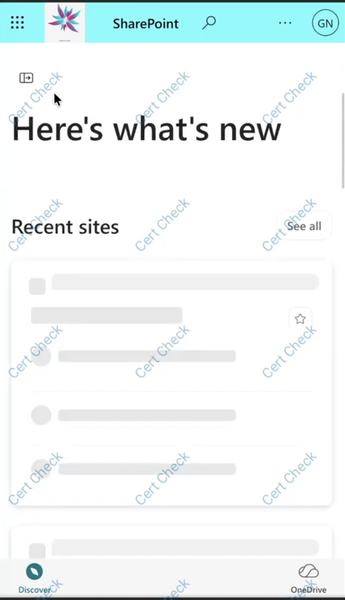
Workspace one Web Browser which is a secure enterprise browser app is built on Android System WebView, we have an Android WebView in which I am trying to load a SharePoint page. However, certain elements of the page are not being rendered or displayed correctly in the WebView. The same SharePoint page renders correctly in a Chrome browser, where all the expected elements are visible. Please refer to the attached image for comparison and reference. In Chrome In Android System Webview based Web Browser (for example Workspace ONE Web) We mainly wanted to know why is this behaviour specific to Android System WebView based browser.378Views0likes1CommentDynamic Mandatory Fields
In a SharePoint library, I have folders which are = a. Admin b. Events c. Furniture and Moves d. Janitorial and Maintenance e. Parking and Transportation f. Shipping and Receiving g. Supplies and Equipment h. Waste and Recycling I have Meta data across the library whose data type are all choices and are: a. Document Type = Contract, Financial, planning b. Building = Gym, Garage, Heating c. Asset Category = Office, Playground d. Fiscal Year = FY23, FY24, FY25, FY26, FY27 e. Vendor = Maple Leaf, Canadian Tire, Home Depot f. Status = Active, Pending, Not Active g. Retention Label = 3 years, 5 years h. Service Type = Admin, Events, Furniture and Moves, Janitorial and Maintenance, Parking and Transportation, Shipping and Receiving, Supplies and Equipment, Waste and Recycling Service Type and Retention Label are mandatory fields, with the Rule below for all the files in the various folders: IF Folder Name = Admin, then Service Type = Admin and Retention Label = 5 years; the mandatory fields should be Document Type, Status and Fiscal Year IF Folder Name = Events, then Service Type = Events and Retention Label = 3 years; the mandatory fields should be Document Type, Status and Fiscal Year, Building and Vendor IF Folder Name = Furniture and Moves, then Service Type = Furniture and Moves and Retention Label = 3 years; the mandatory fields should be Document Type, Status and Building IF Folder Name = Janitorial and Maintenance, then Service Type = Janitorial and Maintenance and Retention Label = 3 years; the mandatory fields should be Document Type, Status and Fiscal Year IF Folder Name = Parking and Transportation, then Service Type = Parking and Transportation and Retention Label = 3 years; the mandatory fields should be Document Type, Status and Fiscal Year IF Folder Name = Shipping and Receiving, then Service Type = Shipping and Receiving and Retention Label = 3 years; the mandatory fields should be Document Type, Status IF Folder Name = Supplies and Equipment, then Service Type = Supplies and Equipment and Retention Label = 3 years; the mandatory fields should be Document Type, Status and Fiscal Year IF Folder Name = Waste and Recycling, then Service Type = Waste and Recycling and Retention Label = 3 years; the mandatory fields should be Document Type, Status and Vendor I have used Column Default Value Settings for SharePoint to display Auto-Display the Service Type and Retention Label, but I cannot seem to perform the conditional mandatory fields using Validations setting for the other requirements. Please help655Views0likes1Comment
Custom column layout breaks on mobile view — SharePoint Online Communication Site
Hi everyone, I'm working on a SharePoint Online Communication Site and I've built a custom card section manually each element (image, text, badge, link) was added as a separate web part and organized inside a column section. On desktop it looks exactly as designed. The issue is on *mobile view*: all elements fall apart. The image sits alone at the top, the text below it disconnected, as if the column grouping doesn't exist at all. I understand SharePoint collapses columns into a single column on mobile, but I'd expect it to at least respect the visual grouping of each block. What I've already tried: - "Embed" web part → only accepts iframe, HTML/CSS not supported - "Script editor / Code snippet" web part → accepts inline CSS but it's not a sustainable solution for non-technical users My question: Is there any native setting, web part, or no-code alternative that allows custom card layouts to look good on both desktop and mobile without breaking the grouping? Thanks in advance.181Views0likes1Comment 386Views0likes1Comment
Sharepoint List Lookup question
Hi I have a Sharepoint list which uses columnn "sfg" as a look up, it then returns "sfglifecycle" for instance. I want to add a calculated column that references uses the figure that's been returned in "sfgLifecycle" and times it by ten, is this possible? if so, how do i go about doing it?284Views0likes2Comments
Sharepoint app links
Hi all Im hoping someone will be able to help me with the Sharepoint app and when it opens links from within the app. I am running the latest version of the Sharepoint app on Android and have created a Sharepoint site on my companies Sharepoint. The site is to be used as a homepage / launch page for my department. I’ve got links to documents that are within my companies Sharepoint site but also links to websites. The links work fine, going to the websites that the Sharepoint launch page is linked to, but they always open within a web browser within the Sharepoint app. This is fine until anyone leaves the Sharepoint app - maybe to look at a photo or access another app. When you return to the Sharepoint app, the web browser that the link opened in has closed and the Sharepoint site is back to the homepage. Can anyone offer any help or advice?177Views0likes1CommentExternal User Sharing via Mobile Apps
I have the following Scenario: Internal documents are shared amongst staff using Sharepoint SubSites with Document Libraries. This works great We work with external contractors to submit their work to us, which at the moment is done via Dropbox. Contractor goes out, does work, documents work with pictures and uploads via dropbox to main office. Our annual subscription to Dropbox is expiring and we dont want to renew. It seems pointless when we get all this storage space with our O365 tenant included. External contractors come and go like the wind, so we ideally want them to use their own personal onedrive. Is it possible to share a Sharepoint Library with an external contact but have them access it via a mobile app, either onedrive or some other app?3.1KViews0likes5Comments
SharePoint Library - Best Strategy for Storing & Viewing Pictures?
Hi all, We are a small contracting/service company and we migrated to SharePoint online just over a year ago. We have built a lot of useful lists and libraries and I would say we are utilizing it quite well, but one thing we haven't figured out is picture/video storage. We service ~200 buildings over a large geographical region and so we have a "Buildings Library" (each building is a folder), and a "Buildings List". In each building folder, we have projects, quotes, and service plans, and each of those subfolders usually has site pictures for each project, quote or service plan. For reference, the "Buildings Library" is currently at 130,000 files, and my best guess is 20-40% are pictures. We will often reference site pictures down the road (1-5 years), but at that point we just want to see all the pictures for that site and while it's nice to know what project/quote it was taken for, we really just want to be able to see all the pictures at once. For our larger buildings, we have many projects and many quotes, which means you may have to click through 30-40 folders trying to find pictures of a certain mechanical room or equipment. Previously we used a network drive and so it was faster to navigate and flip through pictures, but it has still always been frustrating. I've looked at a few different solutions and we tried to create a separate "Site Pictures" library where every time a tech uploaded pictures, they would create a document set with attributes and a lookup to the "Buildings List", but this is cumbersome from mobile and prone to errors. It also would be a massive manual process to move all the existing pictures to this structure. Any ideas? I'm curious if there is an automated method to tag all pictures in a specific folder or something like that. I'm happy to learn whatever is needed to implement, as long as we can keep the user element simple. Cheers,Solved17KViews0likes2Comments