Forum Discussion

Cannot filter modern library by column
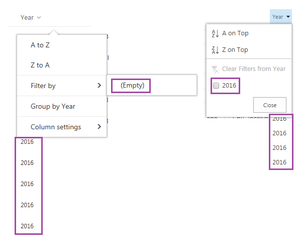


Ya, I went ahead and submitted a ticket a couple hours ago. I'm less concerned about the view. I was trying to give that to the customer as a work around, but they really want to be able to filter by any column at any level in the document library. I'm adding some details to this and I'll follow up with whatever I hear back from support.
The customer has a folder in a document library. When in top level of the document library, columns can be filtered. For example, if a document was modified by "Snow, John" in the top level of the document library, I can filter the Modified By column by "Snow, John" (or any other name that's listed in the Modified By column). In the location column, I can filter by "Castle Black".
Top level of the document library:
| Title | Location | Modified By |
| Folder 1 | Castle Black | Snow, John |
| File 1 | Castle Black | Snow, John |
If I go into a folder (ie. Folder 1), I can only filter by values that are available at the top level. So in the below table, if I click on "Location" I still see "Castle Black" (not "Winterfell") and if I click on "Modified By" I still see "Snow, John" (not "Snow, Ramsay").
Click into folder 1:
| Title | Location | Modified By |
| File 1 in Folder 1 | Winterfell | Snow, Ramsay |
| File 2 in Folder 1 | Winterfell | Snow, Ramsay |
I've tested this in IE and Chrome and get the same thing. When I was on the call with support, he was able to reproduce this in his own environment. I'll update when I get a response.
 DeletedDec 22, 2016
HI, Did you get any response from MS ?
- Sep 21, 2016To me it sounds like a bug...by the way, just remember that modern lists and document library are continuously improved by Microsoft so the idea to open a support ticket is just to cofirm this is not right and that they are working on a fix