Forum Discussion

Cannot Edit Choice Values in List that was imported from Excel?
- Sep 19, 2022
atrain204 I think this is a bug or limitation of creating a list using excel import.
I just tried creating a list with simple excel like:
It created a list properly but same issue with the choice column settings:
Note: "Can add values manually" option is checked - this option allows fill-in choices (any text like single line of text column) in column value.
I would suggest you to raise a support ticket directly with Microsoft and report this behavior. Follow documentation: Get support - online support
Please click Mark as Best Response & Like if my post helped you to solve your issue. This will help others to find the correct solution easily. It also closes the item. If the post was useful in other ways, please consider giving it Like.

atrain204 I think choices were not imported correctly in choice column settings as you imported data from excel.
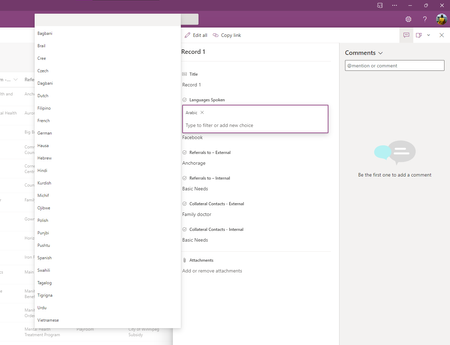
What you see in list form might be the suggestions from existing "text" values entered for the same column - check on different browsers and verify if you can see the suggestions on all browsers.
Also, try this approach to edit the choice column settings:
- Click on Settings (gear) icon and select "List settings"
- Scroll down to "Columns" section on list settings page
- Click on the choice column name - Languages Spoken
- You can see and edit the choice options from column settings page:
Please click Mark as Best Response & Like if my post helped you to solve your issue. This will help others to find the correct solution easily. It also closes the item. If the post was useful in other ways, please consider giving it Like.
- atrain204Sep 19, 2022Steel Contributor
Thanks ganeshsanap. Any thoughts on why the Choice field values weren't imported correctly?
Choice fields and values are (supposedly) supported in the Lists import-from-Excel process, but this isn't working correctly.
- ganeshsanapSep 19, 2022MVP
atrain204 I think this is a bug or limitation of creating a list using excel import.
I just tried creating a list with simple excel like:
It created a list properly but same issue with the choice column settings:
Note: "Can add values manually" option is checked - this option allows fill-in choices (any text like single line of text column) in column value.
I would suggest you to raise a support ticket directly with Microsoft and report this behavior. Follow documentation: Get support - online support
Please click Mark as Best Response & Like if my post helped you to solve your issue. This will help others to find the correct solution easily. It also closes the item. If the post was useful in other ways, please consider giving it Like.
- atrain204Sep 20, 2022Steel Contributor
ganeshsanap thanks for your help. I've opened a ticket with MS support to see what they say. I will update here when I have an answer.
