Forum Discussion

Calculated coulmn : Check if a column value or a part of it matches specific text
- Feb 14, 2022
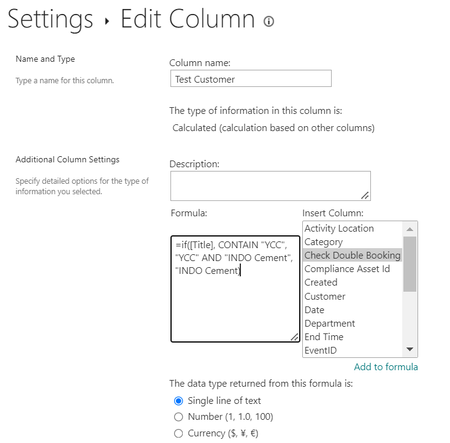
Ghada Mehrez There's no Contain function in a SharePoint calculated column, you'd need to use Find. But the formula is going to be complicated if you are trying to see if the Title column contains YCC or INDO cement and puts in the relevant Text. What would be easier is to use 3 calculated columns:
YCC: =IF(ISERROR(FIND("YCC",Title)),"","YCC")
INDO: =IF(ISERROR(FIND("INDO Cement",Title)),"","INDO Cement")
Then combine the results of those into a third calculated column:
YCC OR INDO: CONCATENATE([YCC], [INDO])
Then just hide the YCC and INDO columns.
Rob
Los Gallardos
Intranet, SharePoint and Power Platform Manager (and classic 1967 Morris Traveller driver)

Ghada Mehrez There's no Contain function in a SharePoint calculated column, you'd need to use Find. But the formula is going to be complicated if you are trying to see if the Title column contains YCC or INDO cement and puts in the relevant Text. What would be easier is to use 3 calculated columns:
YCC: =IF(ISERROR(FIND("YCC",Title)),"","YCC")
INDO: =IF(ISERROR(FIND("INDO Cement",Title)),"","INDO Cement")
Then combine the results of those into a third calculated column:
YCC OR INDO: CONCATENATE([YCC], [INDO])
Then just hide the YCC and INDO columns.
Rob
Los Gallardos
Intranet, SharePoint and Power Platform Manager (and classic 1967 Morris Traveller driver)

Hi Rob, I used this formula below... It seemed to work until my list grew. Is this true that there is a Limit of the number of columns I want to combine.