Forum Discussion

Manoj
Sep 03, 2021Copper Contributor
Calculated Column with comma
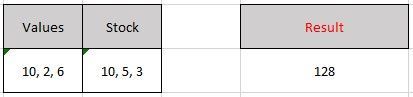
Hi, I have two Columns with numbers separated by commas in a Sharepoint List. I want the result to be calculated in a new column: So the result should be calculated used this logic: ...

RobElliott
Sep 03, 2021Silver Contributor
Manoj It would be much easier if you just had 6 columns for the 10 2 6 10 5 3 and then the Result calculated column would be very simple. If you really need the Values and Stock columns in the format they are then use a concatenate formula for those columns but base the actual calculation on the other 6 columns.
If for some very bizarre reason that is not possible then it would need a solution in Power Automate using the split function.
Rob
Los Gallardos
Microsoft Power Automate Community Super User

Manoj
Sep 06, 2021Copper Contributor
RobElliottthanks for your response.
Requirement is such that the user needs to add data in this format. 6 cols won't work as the number of commas are not fixed.
Do you have any link that shows how to use split in Power Automate?
Thanks