Forum Discussion

sharepointmonions
Nov 08, 2022Copper Contributor
Calculated Column Formula Not Working
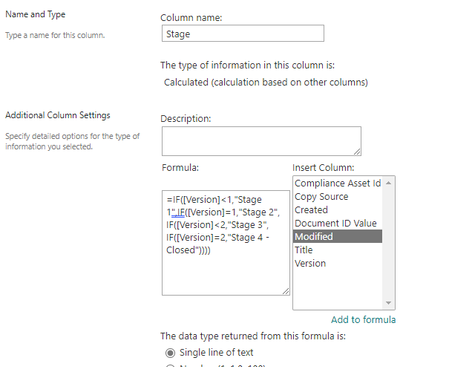
I'm trying to get a column within SharePoint that references another column. Basically: If the Version is <1, column returns Stage 1 If the Version is =1, column returns Stage 2 If the Vers...

sharepointmonions
Nov 09, 2022Copper Contributor
Hi ganeshsanap it was saying there was a technical error, but your formula is accepted. However, it doesn't return Stage 2 for the document that is Version 1:
Even when I just did =IF([Version]<1,"Stage 1","Stage 2") it would still return Stage 1 for the document that is at Version 2.
Even when I just did =IF([Version]<1,"Stage 1","Stage 2") it would still return Stage 1 for the document that is at Version 2.

ganeshsanap
Nov 09, 2022MVP
sharepointmonions What is the column type of Version column?
If it is a single line of text, try using:
=IF(VALUE([Version])<1,"Stage 1",IF(VALUE([Version])=1,"Stage 2",IF(VALUE([Version])<2,"Stage 3",IF(VALUE([Version])=2,"Stage 4 - Closed", ""))))
Please click Mark as Best Response & Like if my post helped you to solve your issue. This will help others to find the correct solution easily. It also closes the item. If the post was useful in other ways, please consider giving it Like.