Forum Discussion

Base Tenant Storage Issues
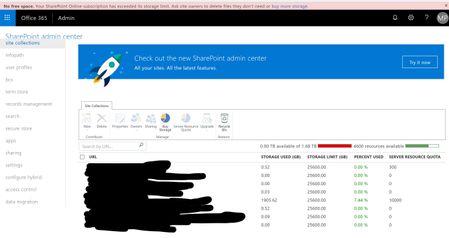
- Feb 07, 2019
First, it can be a bit confusing. Those limits posted are the limits of a site collection, not the storage you actually receive. So a site collection can store upto 25TB, but it doesn't mean you have 25TB of data.
You have 70 total licenses- 66 M365 Business
- 3 E3
- 1 E5
You get 1TB pfor the organization
You get 700Gb (10gb x 70 licenses)
For a total of roughly 1.70tb, or in your case it's estimating about 1.68tb. So you have used up the total amount of storage that was allocated to you, based on the # of users you have in your tenant.

RE: "So a site collection can store upto 25TB, but it doesn't mean you have 25TB of data."
That.is.insane. That's like saying, yes you have X but no, you REALLY don't have X.
😞
What is the point of each team/site SHOWING that it has 25TB of storage IF the overall quota is 1TB+license-allocation??
We moved to Teams so that we could enjoy the benefits of integral communication features that aren't available in Dropbox, while being able to include the pertinent files library within the various teams to which those files relate. We did NOT want to lose our storage capacity equivalent.

kvaden357 It's not saying you have 'x'. Above the SC listing, it tells you have you have 'x' amount of available storage. Then it shows the limit of the Site Collection being 25TB. That's different than saying you have 25TB.
- kvaden357Mar 27, 2020Brass Contributor
Beau Cameron
Ok, that makes a bit more sense. So the second image I posted is showing that the site collection storage capacity is 25TB, not that we actually have that much storage available. If that's the case then this is very misleading. That bar currently appears to show current consumption of available resources per team/site. Frankly I don't see the point of it.
So, if we were to purchase additional storage such that the bar in the top image then showed "x amount used of 25TB", would the bar in the second (per site) image be any more relevant? I don't see how if the overall total purchased is 25TB. It's not like each site would have 25TB of available storage.- Beau CameronApr 01, 2020MVP
kvaden357 25TB is just the max storage capacity of a Site Collection, which is why all sites listed show 25TB.
- kvaden357Apr 01, 2020Brass Contributor
Beau Cameron I get that now, thanks. Again tho', it's very misleading IMO and apparently many others since this question has come up in the past. Most of us know max capacity...but that matters little if you haven't actually purchased max capacity. Even the "Storage used (%)" column in the admin panel's "Active sites" list displays a percentage used of max capacity. It would be more useful for it to show the percentage of max purchased/available. smh