Forum Discussion

Alerts when changes are made not working
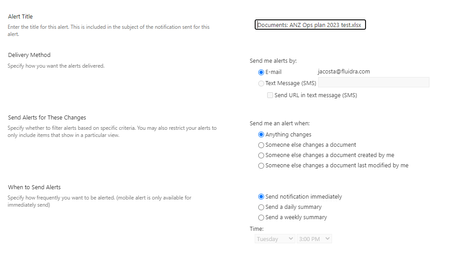

jacosta17 I just tried this in our SharePoint site and it is working fine for me:
Please click Mark as Best Response & Like if my post helped you to solve your issue. This will help others to find the correct solution easily. It also closes the item. If the post was useful in other ways, please consider giving it Like.
For SharePoint/Power Platform blogs, visit: Ganesh Sanap Blogs
 jacosta17Mar 01, 2023Copper Contributorganeshsanap that's not the answer I'm looking for. I explicitly asked for help regarding alerts and getting the notification in my email when changes are made. You're looking at the details view to check who made changes to the file. This is not the right approach as it implies that I have to check the file several times a day to see if changes were made, which basically is a waste of time. I need to automate the process and receive an email when this happens
- ganeshsanapMar 01, 2023MVP
jacosta17 Can you try checking using same alert settings in:
- Another document library in same SharePoint site
- Document library in another SharePoint site
- Using another user account for receiving emails
This will help you to narrow down this problem and to understand if the issue is with this specific library or SharePoint site or whole tenant.
Please click Mark as Best Response & Like if my post helped you to solve your issue. This will help others to find the correct solution easily. It also closes the item. If the post was useful in other ways, please consider giving it Like.
For SharePoint/Power Platform blogs, visit: Ganesh Sanap Blogs
- ganeshsanapMar 01, 2023MVP
jacosta17 If you look closely, the screenshot is not from details view in SharePoint. It is a screenshot of email notification received (via Alerts functionality) after modifications to file in SharePoint.
Alerts settings:
Email notification received:
Please click Mark as Best Response & Like if my post helped you to solve your issue. This will help others to find the correct solution easily. It also closes the item. If the post was useful in other ways, please consider giving it Like.
For SharePoint/Power Platform blogs, visit: Ganesh Sanap Blogs
 TMiller2022Nov 15, 2023Copper ContributorThe point is that you did not provide any assistance. Respond with possible solutions or you're just wasting our time..