Forum Discussion

 Microsoft
Introducing "Request sign-off" - an approval flow that requires no set up

I'm back doing some testing on this again today just to see if anything has changed.
I attended #msignitethetour (in London) and I noticed that "Request sign-off" was included in one of the slide-decks. It was briefly mentioned and they didn't demo the flow end to end ( perhaps luckily for them .. but i was hoping that I would at last see it working)
The presenter suggested that I raise a ticket for this. Personally, I was surprised that this issue wasn't in more common knowledge by now . I can only assume that it's not causing issues for all users (or that adoption has been low and there hasn't yet been a support ticket raised for this)
Has anyone else raised a support ticket for this?
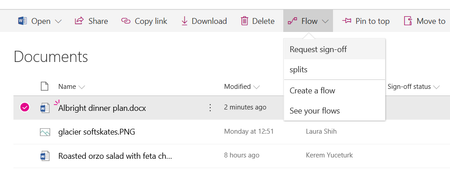
Also, I note that a guest user added to my SharePoint site (an MSA without an O365 licence) , is able to see the "flow" menu and can see "request sign off" on the drop down. However , they are unable to trigger the "request sign-off" flow from the Document library . An error message displays in the Details pane (see attached)
Also I note that a licenced user can not direct the "request sign off" flow to the guest MSA account.
What is the by-design position here. Are MSA guest users unable to interact with Flows unless they have O365 licences (in this case it would be better to hide the Flow menu perhaps?)

Colm Counihan wrote:
Has anyone else raised a support ticket for this?
See above post - still no response since that update from MS Support.
 Jer HarwoodApr 15, 2019Brass Contributor
Chakkaradeep (Chaks) Chinnakonda Chandran - Welcome back to the conversation. It will be great if you can pass on the progress. I'm getting some from my support engineer as you can see I've pasted in this thread to help others out. I was just asked again on Friday to try again and it still doesn't work on a library where it was broken previously. That said I have some interesting observations after more testing. Using content types on a list and library have adverse effects.
The library where this still fails is using a custom content type and the Sign-off status column never updates at all - it remains blank - with the email of the approval result being sent and the previously mentioned "file is locked" message.
A list using content types works but the Sign-off status column never is updated to Pending when the Flow is triggered. It does update to the approval result, however.
If I create a new list or library the Flow works fine in all aspects. Once I add a custom content type and run the Flow it has the issue and then running on any other item results in the same issue as mentioned above.
I've relayed this to the support engineer working my case.
On a side note, the same Flow run from OneDrive has a nice enhancement with an email sent to the initiator to confirm the Flow is running with details of who they sent to approval, a link to the document and a link to check the status (Flow site).
- Chakkaradeep (Chaks) Chinnakonda ChandranApr 15, 2019Former Employee
Jer Harwood wrote:
Just to note, Chakkaradeep (Chaks) Chinnakonda Chandran said he took over for Kerem Yuceturk on page 3 of this thread. However, we haven't heard much out of Chaks since then, nor have I received any updates to my support ticket with Microsoft since the update I posted on 18 March.
Jer Harwood We are now working on a fix - Once I have updates from my team, I would be more than happy to share the update here :)
- Jer HarwoodApr 10, 2019Brass Contributor
Just to note my ticket was not closed yet and I brought up this with the engineer of which he basically said the fix wasn't rolled out completely yet. Here's his response:
Hello Jer Harwood ,
Hope you are doing well !
Since I didn’t get any response from your end. I didn’t closed this service request. I completely understand your concern.
We just got an update from the product team that , the fix to the issue will be rolled out next month , meanwhile we can give you the workaround to resolve the issue .
After the fix becomes available, the "Update file" step in the request sign off template will be replaced with a new action, "Set sign off status," which can bypass the file lock.
At this point, the user can either re-create the flow using the template, or go into the existing flow and manually replace the update file action with the new one.
In the meantime, the workaround is to ensure the file is not locked by closing all instances of it. In addition, newly created files are temporarily locked upon creation, so for newly created files the customer may need to wait until the file is unlocked even if it has never been opened.
Please try and let me know your response.
Regards,
Sai Dinesh
MS Flow and Powerapps Engineer
I have responded to the above asking about the "workaround" as I don't see a way to modify the Flow that's already been activated on lists/libraries nor can I find the Request Sign-off Flow in the Flow templates, which seems silly to use if this is there already.
- Jer HarwoodApr 09, 2019Brass Contributor
SLJ13 Robin Nilsson - I wonder if my tests were not on a list/library where I ran it when it was broken as I just reproduced it on a library where I know I had the issue! Like you both reported it seems to work on a list/library where you haven't tried it before. I know the lists/libraries where I am seeing it work have been around much longer than the issue but I don't believe I tried the Flow on them before the MS support engineer requested me to try again. I'm not sure there's full consistency on whether or not the broken Flow was run on the list, but I do see it on at least one library.
I'd suggest you both put in a support ticket if you have access to. I'll be re-opening the one I have to report this.
- SLJ13Apr 09, 2019Copper Contributor
Thank you for the update :-) Unfortunately it still isn't working for me either :-( All my approved flows are still stuck at/showing as "Pending" — nothing's changed. I'm also still getting the following error message after approval "Name signed off on your item. Note that we were not able to update the column in SharePoint because the file was locked by a user." However, when I switched from a Document List to a Document Library it all seems to work fine.
 Robin NilssonApr 08, 2019Bronze Contributor
Jer Harwood No minor versioning, these are lists, not libraries. However, I did check both lists for versioning. The list that works is on a communication site and has NO versioning setup. (Only because I forgot to set it up). The non working list is in a team site and has the standard versioning setup.
Im trying to test if that is the cause. I’ve turned on versioning on the working list. The signoff still works on my list in my comm site with versioning on.
And yes, same symptom. Approval email comes through saying ‘approved but cannot update ststus because of lock’.
So not sure what that tells me.
List versioning doesn't seem to break it.
List in communication site works, original list in team site doesn't.
Doesn't seem to matter if you do your approval from the forms app on a phone or from the email sent.
Newly created list in team site works. Now that is interesting. Either something is different in creating a new list, or it's the formatting on a column.
Testing formatting a column - that's not it, signoff still works.
So for me, if a list has a broken signoff where the status won't update (due to lock), it won't work every again. Recreate the list, it will most likely work. Which isn't an option obviously.
- Jer HarwoodApr 08, 2019Brass Contributor
Robin Nilsson - That is curious. I tested it in a couple site collections before posting as I wanted to make sure it was working in a handful of different scenarios I have tested before with. Do you have major and minor versioning by chance? It doesn't work with that configuration. Is it the same issue, stating the file was locked and not updating the status?
- Robin NilssonApr 08, 2019Bronze Contributor
Jer Harwood That's great news! I just tested this so I can close out the planner item I have and it's only half there. A list I created last week - I did a request sign-off for the first time today, so it created the flow and it worked. Great!
Then I tried in on the original list where the lock occurred - failed. I turned off the approval function, and even deleted the sign off column. Reinstated signoff and tried again, and still failed.
I'm not sure if the fix isn't all the way in, or it's something in this list that causes the lock (one column has formatting, where the working list has none). Guess I'll have to leave my test open for another week to see if it gets better.
- Jer HarwoodApr 05, 2019Brass Contributor
All - I received an update from the Microsoft support engineer today asking me to test the Request Sign-Off Flow in my environment and I'm glad to say that it is now working again. Why it took over two months to fix is a mystery but at least it's working and hopefully it stays that way so we can confidently share this nice feature with our colleagues, clients and users.
- SLJ13Mar 29, 2019Copper ContributorThank you!
- Jer HarwoodMar 29, 2019Brass Contributor
Seems my reply didn't go through, so here goes another attempt to answer a couple questions.
SLJ13 - You can change the status easiest using the Quick Edit option on the list (like Excel) for any items that are showing a Pending status or if you're not going to utilize content approval just delete that column in the library settings. If you're saying using the "Request Sign-Off" Flow results with the items getting stuck at a Pending status, that's the issue we're talking about that started happening in late January.
Colm Counihan - I should have said using the default major versioning was fine prior to late January. There's no connection to libraries having versioning turned on as I've been using what is now the default major versioning for years and all modern libraries have defaulted that way for at least a couple years, where this feature is available.
Just to note, Chakkaradeep (Chaks) Chinnakonda Chandran said he took over for Kerem Yuceturk on page 3 of this thread. However, we haven't heard much out of Chaks since then, nor have I received any updates to my support ticket with Microsoft since the update I posted on 18 March.
- SLJ13Mar 29, 2019Copper Contributor
Judi Stewart Jer Harwood Kerem Yuceturk
You're right (and thank you for letting me know as I didn't realise) that Versioning and "Request Sign Off" are somehow inter-linked.
Therefore, I went into the Versioning settings in my document list and when "Require Content Approval" is turned on (set to Yes), the option of "Request Sign Off" disappears completely from the Flow options drop-down list!
However, when it is set to No (default), all my approvals get stuck at "Pending".
If anyone has any other ideas or workarounds, I would really appreciate it/like to hear them :-)
- Colm CounihanMar 29, 2019Iron Contributor
Jer Harwood wrote:Judi Stewart - Yes, this doesn't work using major and minor versioning for the reason you stated, nor in conjunction with Content Approval. Using the default major versioning is fine.
Still not working on my tenant. tested it again today.
@judi Stewart may have hit on the reason why it was working and now it is not. i.e. versioning. It is impossible to NOT have versioning on a modern document library in SharePoint Online.
I understand that the ability to disable versioning on a SharePoint Online document library was removed at some point back in 2018 ( there is someone complaining about it over here https://techcommunity.microsoft.com/t5/SharePoint/Versioning-update-to-Document-Libraries-in-team-sites-in/td-p/194211
Funny thing is .. I actually don't have a business requirement for this "request sign off" Flow. however, if its something that is so easy to enable but doesn't work end to end I'm puzzled as to why it's still there and also being (half) presented in demos. The demos never show what happens when the approver approves it (possibly because the presenter and the audience think the hard part is done of course the rest of it works).
- Jer HarwoodMar 28, 2019Brass Contributor
Judi Stewart - Yes, this doesn't work using major and minor versioning for the reason you stated, nor in conjunction with Content Approval. Using the default major versioning is fine.
 Judi StewartMar 28, 2019Copper Contributor
Jer Harwood , Kerem Yuceturk , SLJ13 - Haven't tried this recently but when I first tested this feature I had this kind of problem on DocLibs and lists where versioning is active. It seemed to me that the workflow that manages versioning was triggered when the Flow tried to update the target metadata fields and the two got interlocked. When I removed versioning on the test object and retried the flow it seemed to work correctly.
- Colm CounihanMar 08, 2019Iron ContributorI note that the OOTB "submit page for approval" flow appears to be working.. so there's hope yet
- Jer HarwoodMar 08, 2019Brass Contributor
Just to give today's update from the MS support engineer, and their first time acknowledging "multiple requests from the customers" around the issue:
Hello Jer Harwood,
Hope you are doing well !
We have received multiple requests from the customers and we have identified this as ongoing issue.
Our Product team is still working on this issue.
I’ll keep you posted regarding the updates.
Regards,
Sai Dinesh
MS Flow and Powerapps Engineer
- Jer HarwoodFeb 28, 2019Brass Contributor
I just received this response that unfortunately doesn't give us much indication of when it will be fixed nor is it really any different from the update sent a week ago:
From: Sai Dinesh Koneti (MINDTREE LIMITED)
Sent: Thursday, February 28, 2019 2:57 PM
To: Jer Harwood
Cc: MSSolve Case Email
Subject: RE: [REG:119013024003393] Request Sign-Off Broken. Multiple users from various tenants have complained for the last few daysHello Jer Harwood,
Hope you are doing well !
Our sincere apologies for the delay in Response. Product team is currently working on this issue with high priority.
We will share the updates with you once we got information from the Product team.
Regards,
Sai Dinesh
MS Flow and Powerapps Engineer
 AnonymousFeb 28, 2019
We have it both with OOTB and with ones we created. The issue is that is someone has the document open while the work flow is running it locks the record for about 10-15 mins. Even if the file is closed subsequently in that time, the flow does not retry and they have suggested and site there until it times out in 30 days. I logged this and they said this was currently being review and working on a resolution.
So what we have done is introduce an 8 hour delay, so that the write to the metadata only happens in the middle of the night ... assuming no one is working at that time.
- Jer HarwoodFeb 28, 2019Brass Contributor
Colm Counihan wrote:Thanks for raising this.
Wondering if it's being treated as an issue with an individual tenant or as global one.
If an OOTB Flow is having a problem with file locking.. i'm guessing that any Flows that need to update list items or documents are having the same issue.
They are treating it as a global issue, as far as I can tell, as they have not interacted with my tenant at all and have only given updates about working on this "high priority" issue. They call it that, but it's hard to believe given how long it's been broken.
We have multiple custom built Flows active in our tenant that update items without any issues, so it seems to be isolated to the specific "Request Sign-Off" Flow.
- Colm CounihanFeb 28, 2019Iron Contributor
Thanks for raising this.
Wondering if it's being treated as an issue with an individual tenant or as global one.
If an OOTB Flow is having a problem with file locking.. i'm guessing that any Flows that need to update list items or documents are having the same issue.