Forum Discussion

 Microsoft
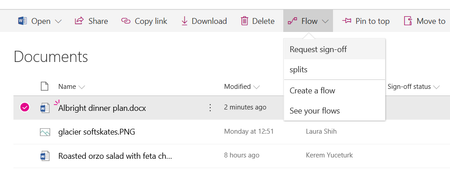
Introducing "Request sign-off" - an approval flow that requires no set up

Kerem Yuceturk - Is anyone at MS looking at this? I went to introduce this "great" feature to someone in leadership only to be embarrassed that it is BROKEN as others have pointed out recently. It appears it has been broken for a number of days now and there's nothing in O365 Admin Center about it.

Hi all,
I am Chaks and have taken the ownership of this feature from Kerem. First off, thanks for the awesome feedback here. While I am happy to hear you all love this feature, I can feel your frustration when it comes to feature not working as expected!
Just wanted to provide some update on some of the issues reported here - especially with Sign-off column not being updated which is an after effect of the file being locked for a long time by the user. This could happen if the file is open in the browser or client for a long time, which is very common, as we can see from the responses in this thread itself. This issue exists today in SharePoint and as one of the users pointed out here, even a custom flow updating file properties will encounter this issue.
Good news is that the product team will be looking into this issue specifically for Request sign-off feature and ensure we are able to "fix" this issue in the product. I will keep this thread updated as and when we have more updates to share.
In the meanwhile, please do continue to share your feedback!
Thanks,
Chaks
- Chakkaradeep (Chaks) Chinnakonda ChandranAug 26, 2019Former Employee
Hi all,
Wanted to share some good news! We just rolled out the fix for the file lock issue for the Request sign-off feature! If you go to your list or library and click on Request sign-off, you will be prompted to create a new flow (for once for that list) and then you should get the updated flow.
One known issue is that the file lock may not work with Excel files. We know the issue and will be working with the Excel product team to come up with a fix. It is an issue with the Office Excel client than SharePoint. Other than that, this update should work with other file types.
Please do let us know if it works for you! Looking forward to your replies!
Thanks,.
Chaks
 Andrew WooSep 23, 2019Brass Contributor
Hi, I found this function a little bit weird. What is the objective here?
If the approval has approved and the column was not locked and anyone can change to anything... I can even type some other wording other than the chosen, such as, WIP or waiting list which is not specific.
Regards
Andrew
- Paul StorkFeb 20, 2019MVP
I run the risk of piling on, but I want to add a couple of specific points.
1) I've experienced this in at least three tenants and across multiple libraries
2) The failure is consistent. It happens on files that haven't been edited for over two weeks and on files that are newly created in Word Online. There should be no remaining file locks in those cases. I have seen no cases where updating the column succeeds. They all fail. But the column can be updated manually immediately after the flow completes. If there is a file lock that shouldn't be possible.
 Marcus_KhooFeb 21, 2019Brass Contributor
I am so surprised that this feature was rolled out to all tenants into production environments when it clearly does not work. 😐
- Jer HarwoodFeb 21, 2019Brass Contributor
Marcus_Khoo wrote:I am so surprised that this feature was rolled out to all tenants into production environments when it clearly does not work. 😐
It did work after being rolled out for a good amount of time. It didn't break until around the time the complaints of the "file lock and lack of column updating" comments started happening here (Jan 18th).
Two days ago I received a reply to my message on Feb 7th (12 days to get a reply!) from the engineer assigned to my support ticket about this issue. I'm not so sure how "high priority" it really is with it being broken for... over a month now. Here's his response:
Hello Jer Harwood,
Hope you are doing well !
Our Product team is currently working on this issue with high priority.
I’ll keep sharing updates with you.
Regards,
Sai Dinesh
MS Flow and Powerapps Engineer
- Sharepoint-user1Feb 18, 2019Copper Contributor
Hello,
I also have this concern :
"Note that we were not able to update the column in SharePoint because the file was locked by a user."
> For me it's not a file like excel or word, but a simple item from a list in sharepoint..
Thanks advance every! (I am new in the field so be indulgent thank you). - Jer HarwoodFeb 15, 2019Brass Contributor
Chakkaradeep (Chaks) Chinnakonda Chandran wrote:Hi all,
I am Chaks and have taken the ownership of this feature from Kerem. First off, thanks for the awesome feedback here. While I am happy to hear you all love this feature, I can feel your frustration when it comes to feature not working as expected!
Just wanted to provide some update on some of the issues reported here - especially with Sign-off column not being updated which is an after effect of the file being locked for a long time by the user. This could happen if the file is open in the browser or client for a long time, which is very common, as we can see from the responses in this thread itself. This issue exists today in SharePoint and as one of the users pointed out here, even a custom flow updating file properties will encounter this issue.
Good news is that the product team will be looking into this issue specifically for Request sign-off feature and ensure we are able to "fix" this issue in the product. I will keep this thread updated as and when we have more updates to share.
In the meanwhile, please do continue to share your feedback!
Thanks,
Chaks
Chaks - Does the product team have any kind of timeline on fixing this? IMO, it's pretty unacceptable to have this feature published out there for all tenants when it doesn't work after it was working fine for many months. The message about the file lock is new for the result email as well as a new issue. As said, this didn't happen only weeks ago and all of the sudden started happening. It can be reproduced easily on both libraries where documents haven't been opened in months and on a custom list where there's no "document" to be locked.
I have submitted a support ticket via our O365 Admin Center on January 30th and I've receieved only one response on Feb 6th (outside of the initial automated emails stating the ticket has been opened) asking when would be good to talk about it after giving them full details and a link to this thread. I don't understand what the delay on getting this attended to is. Of course I asked if they looked at this thread and haven't heard back since. This is definitely the worst customer service I've experienced with Microsoft support and what makes it worse is we have this thread showing it's an issue in all tenants.
 Aaron_TPIFeb 14, 2019Copper Contributor
Hi Chaks,
Glad to hear someone is taking ownership. The file lock issue is not the root cause of the problem in my environment. The status never updates even if the file is checked in and not open anywhere on any device. There is no circumstance in which I've been able to get the status to appear as anything other than pending.
Regards,
Aaron
- Colm CounihanFeb 12, 2019Iron Contributor
I guess it will be mainly people who have recently reported a problem with this feature that will be monitoring this thread (if I reported it broken over 12 months ago I'd most likely have forgotten about it.. but my overall confidence around the Flow product would have been impacted)
I was a bit late to the party on this one.. is anyone saying that this feature is actually working.. with the exception of a few minority cases where the Sign-off status isn't gettting updated. I've actually never seen it working (though I haven't tested it more than half a dozen times).
So I'm wondering is the "file-locking issue" something that has been introduced recently? is it linked to recent changes relating to Auto-save? I'd have thought that as Co-authoring on files is expected as standard that we wouldn't be seeing "file-locking issues".
Glad to hear that the team are going to be looking at this
- Chakkaradeep (Chaks) Chinnakonda ChandranFeb 13, 2019Former Employee
Colm Counihan wrote:
I guess it will be mainly people who have recently reported a problem with this feature that will be monitoring this thread (if I reported it broken over 12 months ago I'd most likely have forgotten about it.. but my overall confidence around the Flow product would have been impacted)
I was a bit late to the party on this one.. is anyone saying that this feature is actually working.. with the exception of a few minority cases where the Sign-off status isn't gettting updated. I've actually never seen it working (though I haven't tested it more than half a dozen times).
So I'm wondering is the "file-locking issue" something that has been introduced recently? is it linked to recent changes relating to Auto-save? I'd have thought that as Co-authoring on files is expected as standard that we wouldn't be seeing "file-locking issues".
Glad to hear that the team are going to be looking at this
The file lock issue isn’t new. You can repro it easily even using SharePoint UX. Try to update a property of a document when its open in the browser or client, you will get an error message that you cannot update the property.
- Colm CounihanFeb 14, 2019Iron Contributor
Thanks.
I've been able to reproduce the issue in the UX as you described and i can see how this might be causing the issue.
the question remains what is causing the "File lock" issue . from the testing I've done, I don't have the document open in the browser or the client.
Is the file getting opened and locked by Flow and when it tries to update the [status] column it can't because the flow has locked the file?
My original question was in relation to something having changed recently to cause this Flow to stop working or to find out if the Flow actually worked at some point? If the "file locking" issue is the root cause and this is a long-term Known issue then this Flow may never have worked end to end.

