Forum Discussion

Trouble receiving OTP emails from Microsoft Partner Center
 May 28, 2026
Success!
Jill was able to put me in touch with someone that was able to point me in the right direction. It turns out that Microsoft is sending messages from the microsoft.onmicrosoft.com domain.
From: token(at)microsoft.onmicrosoft.com
Subject: Action required: Please verify your email addressIn addition to our organization blocking mail sent from *.onmicrosoft.com domains for security reasons, the messages were apparently being blocked at the M365 perimeter for a period of time because I couldn't even find this in message logs when I first reported the issue back on 1/23/2026.
I didn't see any messages through message tracking in April. However, as of May 28th, they are reaching the message tracking logs!
I suspect the partner center portal was failing to hand the messages off for delivery for a period of time.
In the meantime:
Dear Microsoft,Please update the public documentation to reflect that the partner center sends mail from the domain microsoft.onmicrosoft.com, or send the messages from a domain that is already documented. Here's a list of domains Microsoft says are genuine. The implication being that mail from microsoft.onmicrosoft.com is not genuine.
Can I trust email from the Microsoft account team? | Microsoft Support
accountprotection.microsoft.com
How to determine if an email from Microsoft support is genuine - Azure | Microsoft Learn
Microsoft support uses the following domains to send emails:
microsoft.com
microsoftsupport.com
mail.support.microsoft.com
office365support.com
techsupport.microsoft.comOn a side note, I found the following page while looking to see if anyone has encountered this type of issue before and yes, yes they have.
When Blocking onmicrosoft.com Make An Exception For Microsoft – Denny Cherry & Associates Consulting

 Community Manager
jonwbstr24 I have moved your inquiry to our Partner-led tech topics board in hopes someone here has some info to share. I am also tagging some superusers in case they have some ideas. 🤩

Could not think something else rather than the below:
Whitelist Sender: Ensure you email is not blocked by your IT department or firewall.
Browser/Session Issues: Use InPrivate/Incognito mode to avoid cached data interference.
Verify Profile Email: Ensure your primary contact email is not a generic address (e.g., info@, sales@).
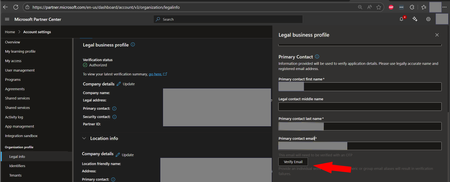
Trigger "Resend": Navigate to the Partner Center Legal Info or Profile page and use the "Resend verification email" option
For visibility and awareness, please let us know how you cope with this matter.
Wr,
Nick
- jonwbstr24Apr 29, 2026Iron Contributor
Hi Nick,
Thanks for the reply. I would love to whitelist the sender!
Could someone help me track down the email address these messages are coming from?
It's not the browser. I've tried multiple browsers, multiple computers, multiple locations.
It's not the email address. I've tried different email addresses at the same domain.
I have resent the message over 30 times in the last 60 days. Multiple times on the same day and multiple days and weeks apart. The message has yet to get delivered.I firmly believe the M365 platform is doing something weird, and at this point it is starting to look like I need to try sending the message to a domain hosted on not microsoft to try and figure out why microsoft is not allowing the message through.
It wouldn't surprise me if Microsoft's own mail servers are being blocked the inbound message at the perimeter.
Wouldn't that be funny, the partner center team isn't responsible for helping me verify the message reached the destination mail server (M365). Also, M365 isn't responsible for helping me identify messages being blocked at the perimeter. Therefore, Microsoft has created a potential support paradox.