Forum Discussion

Domain matching despite business verification rejection
 Jul 25, 2025
Hi everybody, I want to give you my experience with registering as a MS Partner. Both the business and the Domain part of the process failed for 6 weeks. I even had everything deleted and tried again. I continually received these form messages with no description as to why it wasn't "matching" or why they could not verify my company information. I then changed the MS information to exactly match the CASE for both the Company name and email. On my EIN, the company name was in all caps. Once I made the company name all caps, it was a match and automatically approved. Once I changed the email to match the format of the email on the domain registration receipt (looks like this @GetAdaptiveIT.com), the domain was instantly approved. I hope this helps!

 Community Manager
alfred45 I agree, their responses could be more clear.
My recommendation is to update your legal info in partner center to match exactly (down to the letter!) the address on your paperwork and resubmit. You should get through pretty quickly after that. Keep us posted.

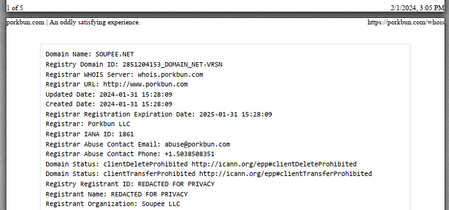
So after a few more back and forth, they are still asking for the matching domain invoice/ registration:
"Dear Partner,
Thank you for the documents you have provided. Unfortunately, they don't list the information required/requested.
Please ensure that they are issued within the previous 12 months:
- Domain registration / Domain invoice at registration or renewal that lists Entity/Username and domain as it is stated on your account.
- If not possible to provide additional documentation, please update your account information to match with documents already provided.
- If you are operating as a Sole Proprietor, please update your company name to be your legal name.
Domain Name : soupee.net
Entity Name : Soupee
registrant Name : ******* *******
Thank you and best regards,
Microsoft Operations"
Hopefully I am getting close to resolve the issues as it appears they have accepted the official business document and found everything matches. Will continue to update.
- alfred45Feb 29, 2024Copper Contributor
So it appears they may have finally accepted both documents, at least over the email. At least they don't appear to say anything else about both the requested documents:
"
Dear Partner,
Thank you for your inquiry about your Microsoft Partner Network account in Partner Center. Apologies for the inconvenience, but could you please try to appeal the rejected account for the domain verification? You can find the instructions here:
To appeal a rejected application, use the following steps:
- 1.At https://partner.microsoft.com/dashboard/account/v3/organization/legalinfo#mpn, select Fix now.
- 2.In Account Verification, from Select document type to upload, select the type of document that you want to upload for verification.
- 3.In Enter your comment, you can add additional information about your appeal.
- 4.Select Upload.
The amount of time required to review an appeal varies. You can return to https://partner.microsoft.com/dashboard/account/v3/organization/legalinfo#mpn to check verification status at any time. Verification status is Pending during the review.
https://learn.microsoft.com/en-us/partner-center/verification-responses#checking-your-verification-status
Thank you and best regards,
Microsoft Operations"The issue is that there is no "Fix now" button appearing on my page! Can this be escalated to an engineer so they can add that button? I do not see it:
Another capture when "Things to take care" is pressed:
In the meantime, how should I proceed? I will be responding to the email in order to keep all the progress I had made. It would be nice that if the documents are accepted over email, they should be able to approve my verification from there.
- alfred45Mar 06, 2024Copper Contributor
alfred45I received an update from them:
"
Dear Partner
Thank you for your inquiry about your Microsoft Partner Network account in Partner Center. We are currently investigating your Microsoft Partner Network account for Seller ID (xxxxxxxx). There is no action required from you at this time. We will update you accordingly.
Thank you and best regards,
Microsoft Operations "
I hope they work on fixing the button so I can move forward with my application. They've sent this the previous two days but have not gotten any further updates. Thanks so far to staff for continuing to work on it.
 Gaspar2210Mar 13, 2024Copper Contributor
Tentámos verificar as suas informações de perfil SellerId 87381440 do Centro de Parceiros, mas não conseguimos fazê-lo
Não nos é possível verificar as suas informações de perfil e dar-lhe acesso total ao Centro de Parceiros.
Após várias tentativas sem êxito de verificar as suas informações, terminámos o processo de verificação. Não serão tomadas mais medidas nesta verificação de perfil.
A não conclusão do processo de verificação no prazo de 30 dias pode resultar na terminação da sua relação com a Microsoft.
micrômetro
Translation below:
We've tried to verify your SellerId 87381440 Partner Center profile information, but we're unable to do so
We are unable to verify your profile information and give you full access to Partner Center.After several unsuccessful attempts to verify your information, we have completed the verification process. No further action will be taken on this profile verification.
Failure to complete the verification process within 30 days may result in the termination of your relationship with Microsoft.
micrometer