Forum Discussion

SeanCnoSystems
Oct 28, 2022Copper Contributor
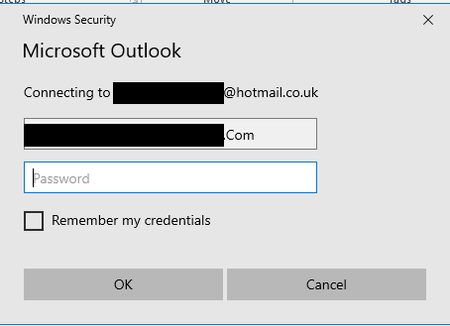
Outlook Security Prompt
Hi, I am having an issue where one of the users on our system is continuously being prompted to enter their username and password. However upon doing this, the prompt will simply reappear. ...

petergroft
Nov 09, 2022Tin Contributor
Exit Outlook.
Open Control Panel, and then do one of the following:
In Windows 10, Windows 8.1, or Windows 7, click Start, type control panel in the search box, and then press Enter.
In Windows 8, swipe in from the right side to open the charms, tap or click Search, and then type control panel in the search box. Or, type control panel at the Start screen, and then tap or click Control Panel in the search results.
In Control Panel, locate and double-click Mail.
Click Show Profiles, select your Outlook profile, and then click Properties.
Click E-mail Accounts.
Select your email account, and then click Change.
In the Change Account dialog box, click More Settings.
In the Microsoft Exchange dialog box, select the Security tab.
On the Logon network security list, select Anonymous Authentication, and then click OK.
Click Next, click Finish, and then click Close on the Account Settings dialog box.
Click Close on the Mail Setup dialog box, and then click OK to close the Mail control panel.
Hope You Find This Useful,
Peter
Open Control Panel, and then do one of the following:
In Windows 10, Windows 8.1, or Windows 7, click Start, type control panel in the search box, and then press Enter.
In Windows 8, swipe in from the right side to open the charms, tap or click Search, and then type control panel in the search box. Or, type control panel at the Start screen, and then tap or click Control Panel in the search results.
In Control Panel, locate and double-click Mail.
Click Show Profiles, select your Outlook profile, and then click Properties.
Click E-mail Accounts.
Select your email account, and then click Change.
In the Change Account dialog box, click More Settings.
In the Microsoft Exchange dialog box, select the Security tab.
On the Logon network security list, select Anonymous Authentication, and then click OK.
Click Next, click Finish, and then click Close on the Account Settings dialog box.
Click Close on the Mail Setup dialog box, and then click OK to close the Mail control panel.
Hope You Find This Useful,
Peter