Forum Discussion

Outlook 365 "forced categories" in FROM field
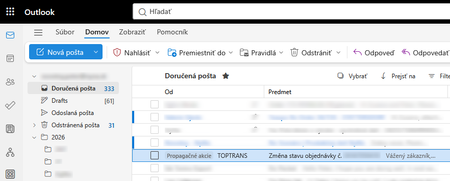

I would recommend checking whether Focused Inbox or other automatic email classification features are enabled. Disabling Focused Inbox in Outlook Desktop or Outlook on the Web may help determine whether these labels are related to Microsoft's automatic message organization features.
I am using mu Outlook Portuguese Brazil Languange.
But In englishh the option are- Settings→ Email→ Layout or Message List
Settings → Mail → Layout → Focused Inbox (disable the option).
If you are using Outlook Desktop go to - View - Focused Inbox (disable the option)
 PeterNovotnyOct 07, 2026Copper Contributor
Thank you for this idea, have tested it and has no impact.
More precisely: In focused inbox the mentined e-mail is not visible at all. In normal inbox the e-mail is visible as on screenhot of my first post.
Edit: and when I was testing added one more test from my coleague "Add the sender to trusted senders" - unfortunatelly also without any change, still getting the "Promotios" displayed.