Forum Discussion

Outlook 365 "forced categories" in FROM field
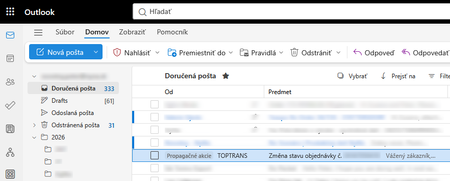

The screenshot shows “Promotion” inline before the sender, while the message has no matching item in your Categories list. That distinguishes it from Outlook’s user-managed color categories, which can be renamed or removed through Categorize. It appears to be a service-generated classification in the Outlook web interface, and Microsoft’s published category and view settings do not document a control for hiding that inline label. Rules, Sweep, or deleting a color category will not remove a presentation label. Compare the mailbox in classic Outlook; if the label is absent there, you have confirmed a web-client feature or rollout rather than mailbox data. Send the screenshot and one affected message’s headers through Help > Feedback, and ask your administrator to open a Microsoft 365 support case. Until Microsoft exposes a setting, classic Outlook or a different supported message-list view is the safest workaround; avoid modifying mail-flow rules merely to hide the display.