Forum Discussion

when sharing Outlook Mail with Teams the Mail does not appear in right Channel
 DeletedNov 29, 2023
Helloaesposito1982
welcome to the Microsoft community, my name is Recep I'll be happy to help you today.
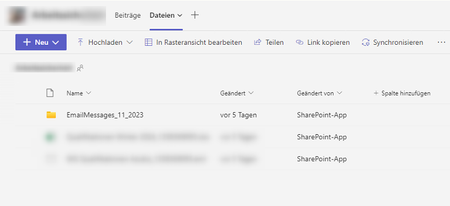
I understand that when sharing Outlook Mail with Teams the Mail does not appear in rightChannel, mails are stored in a directory called"EmailMessages_11_2023"
Please note that when email arrives for a channel, Teams captures a copy in the SharePoint team site belonging to the team. Each channel has its own folder, and if messages arrive in the channel, they go into the Email Messages folder under the channel folder.That is, until February 5 when Microsoft changed how delivery works. Instead of creating copies in the Email Messages folder, a new folder called EmailMessages_2_2021 appeared in the channel folder (Figure 3). New messages received since are in separate folders created for each month.
Figure 3: The EmailMessages_2_2021 folder appears in TeamsIf I have answered your question, please mark your post as Solved
If you like my response, please give it a Like

Appreciate your Kudos! Proud to contribute! 🙂
Helloaesposito1982
welcome to the Microsoft community, my name is Recep I'll be happy to help you today.
I understand that when sharing Outlook Mail with Teams the Mail does not appear in right
Channel, mails are stored in a directory called"EmailMessages_11_2023"
Please note that when email arrives for a channel, Teams captures a copy in the SharePoint team site belonging to the team. Each channel has its own folder, and if messages arrive in the channel, they go into the Email Messages folder under the channel folder.
That is, until February 5 when Microsoft changed how delivery works. Instead of creating copies in the Email Messages folder, a new folder called EmailMessages_2_2021 appeared in the channel folder (Figure 3). New messages received since are in separate folders created for each month.
Figure 3: The EmailMessages_2_2021 folder appears in Teams
If I have answered your question, please mark your post as Solved If you like my response, please give it a Like Appreciate your Kudos! Proud to contribute! 🙂 |

Deleted
When trying to share email into MS Teams, ours doesn't not even recognize any of the Channels we've created - any idea why this would be happening? "We didn't find any matches." is the only thing that shows up and you can see below we have all the Channels set. Thoughts?