Forum Discussion

Unable to assign user number to a user in MS Teams
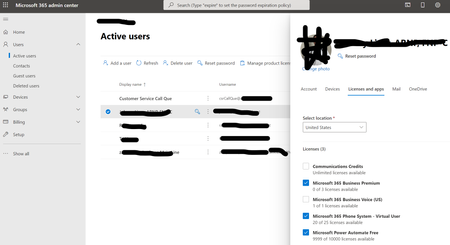


For Teams to provide the ability to make and receive phone calls, and assign phone numbers, you need to assign the following licenses:
- Teams Phone System
- Domestic Calling Plan
The Teams Phone System license is available as an add-on license to Office 365 A1/E1, A3/E3 and I believe both Microsoft 365 Business Standard and Premium. It comes as part of the licensing package for Office 365 A5/E5.
The Teams Phone System - Virtual User license is used for Auto Attendants and Call Queues. It has the same Teams Phone System license, but it is a free license specifically setup for those resource roles. You shouldn't assign it to a regular user.
The reason you're getting the error about needing the "Phone System - Virtual User" license is because you wouldn't have the necessary license required for the Domestic Calling Plan. Go into your Office365 admin portal, then Billing > Purchase Services > and search 'Phone' and you're looking for the one that is listed as "Microsoft 365 Phone System". That's the license that will get you what you're after.