Forum Discussion

Unable to assign user number to a user in MS Teams
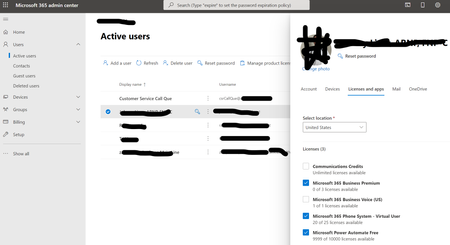

Thank you for the reply. When I purchased the Microsoft 365 Business Voice, I thought it came with a domestic calling plan. I purchased a Microsoft 365 Domestic Calling (as seen in the image below) and assigned it to my account. When I did this, I received an error message that a Virtual user account was necessary, so I also licensed that as well.
However, who I go back to MS Teams admin and try to assign the user number to that account, I have the same problem as I did in my original message, it cant find the account
 janglissJul 01, 2021Steel Contributor
For Teams to provide the ability to make and receive phone calls, and assign phone numbers, you need to assign the following licenses:
- Teams Phone System
- Domestic Calling Plan
The Teams Phone System license is available as an add-on license to Office 365 A1/E1, A3/E3 and I believe both Microsoft 365 Business Standard and Premium. It comes as part of the licensing package for Office 365 A5/E5.
The Teams Phone System - Virtual User license is used for Auto Attendants and Call Queues. It has the same Teams Phone System license, but it is a free license specifically setup for those resource roles. You shouldn't assign it to a regular user.
The reason you're getting the error about needing the "Phone System - Virtual User" license is because you wouldn't have the necessary license required for the Domestic Calling Plan. Go into your Office365 admin portal, then Billing > Purchase Services > and search 'Phone' and you're looking for the one that is listed as "Microsoft 365 Phone System". That's the license that will get you what you're after.