Forum Discussion

Teams Meeting Time Defaults to 24 Hours When Using the Teams Add-in for Outlook
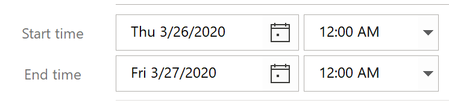

The issue occurs when the Outlook calendar is in month view.
I'm able to reproduce the issue as follows.
- Launch Outlook and navigate to the Calendar view
- Choose "Month" from the "Arrange" section of the ribbon
- Click the "New Teams Meeting" button in the ribbon
Expected result:
A new Meeting window opens with a start time and end time corresponding to the "Default duration for new appointments and meetings" set in Outlook Options > Calendar
Actual result:
A new Meeting window opens with a start time of 12:00am on today's date, and an end time of 12:00am the following day

Thanks for this last Post.
I always use Month view in Outlook Calendar. In any other view, if I 'click' on a Start Time for the intended meeting, and then click on 'New Teams Meeting' in the ribbon bar, I can now say that this method DOES use the default 00:30 mins (in my case) set for a meeting duration.
Not my usual, work flow, but can adapt knowing this.
For MS, I would still like to use the same workflow as 'New Appointment', they should work the same!! Start in Month View, click the day, click 'New Teams Meeting', change the Start Time, and the end time defualts to 30mins after.
..
 ChristianBergstromJun 18, 2020Silver Contributor
Duanne Hello Duanne, it's a bug and will be fixed in a later release I'm sure (I use the monthly view as well).