Forum Discussion

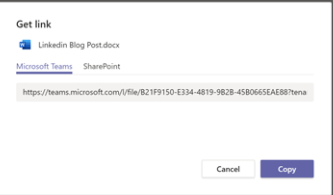
Teams Get Link Dialog Missing - Can't Get a Teams Link
 Nov 23, 2020
chriswest-jnctn @PeterRising @Mohammed_Khan
I had the same problem on my computer, but clearing the Teams cache solved it.
I deleted the cash by following the steps described in the blog below.
https://commsverse.blog/2018/09/28/clear-the-microsoft-teams-client-cache/
chriswest-jnctn @PeterRising @Mohammed_Khan
I had the same problem on my computer, but clearing the Teams cache solved it.
I deleted the cash by following the steps described in the blog below.
https://commsverse.blog/2018/09/28/clear-the-microsoft-teams-client-cache/
 Mohammed_KhanNov 23, 2020Copper Contributor
Katsutake_Nagano @chriswest-jnctn @PeterRising
Thanks for the tip, the links returned to normal with the clearing the cache for me.
Cloud services are mysterious and full of surprises 🙂
- PeterRisingNov 23, 2020MVP
Katsutake_Nagano Thank you for sharing this. Excellent tip.

- Mohammed_KhanDec 06, 2021Copper Contributor
Hello @Katsutake_Nagano and PeterRising,
I am facing the same problem again in Teams - only sharepoint option for creating Teams links to document. Have cleared the cache, but the problems persists....any assistance would be highly appreciated.
- chriswest-jnctnNov 23, 2020Brass Contributor
Katsutake_Nagano I was not confident about this, but you are right! Clearing the Teams cache has returned the dialog for selecting Teams or SharePoint links. Thank you for posting this.

