Forum Discussion

How to Reference the Last Cell in a Column in a Table?
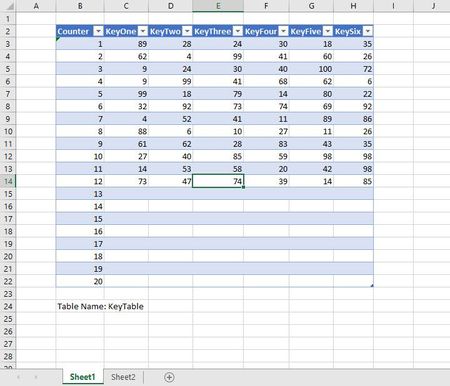
 Sep 29, 2020Thank you for your reply. I looked at your and JMB17's reply to create me own.
Initially, I mentioned about the count. I did not want to have to manually keep track of the count, but I can use the count function to help me.
I am not sure how to show code, but my formula is as follows:
` =INDEX(KeyTable[KeyThree], COUNT(KeyTable[KeyThree]))
It's really just a hybrid of the two prior ideas.
Thank you for helping me with this small problem.
I tried the following formula in an attempt to understand what you did:
=XMATCH(,KeyTable[KeyThree])
I got an answer of 13, which is one more than the number of filled rows.
I also tried the following:
=XMATCH("*",KeyTable[KeyThree])
I got #N/A for an answer.
I am guessing that when you skip the first argument, XLOOKUP looks for any value, similar to a wildcard. But I got a value of 1 greater than the number of data rows. So I am puzzled. I am also puzzled why a wildcard failed.
Can you, please, elaborate?
Kevin

I hadn't realised that you could simply omit the lookup value but it appears to work as a search for the first blank cell, hence the index returned is 1 larger than the last occupied cell.
To make your search for the last cell work, several changes are needed
= INDEX( KeyTable[KeyThree],
  XMATCH( "*", KeyTable[KeyThree], 2, -1) )
Firstly, the table would need to be text and not numeric. By default, XMATCH performs an exact match without wildcards so the parameter value 2 is required. Finally, you require the last match, not the first, so the -1 is used.
My use of SIGN within XLOOKUP causes it to return the last positive number; text, zeros and even negative numbers would be ignored.
I agree that my using LET is unnecessarily verbose, especially since the structured references to the table already convey meaning. I suspect that it is also a matter of what one gets used to. If all the formulae in the workbook use LET to provide a level of self-documentation, then it would no longer be seen as complicated.
- KStecykSep 30, 2020Brass Contributor
I hadn't realised that you could simply omit the lookup value but it appears to work as a search for the first blank cell, hence the index returned is 1 larger than the last occupied cell.
I had to remove the rest of your post from the quote because I system wouldn't post it. There was a hiccup with html or something.
Thank you, Peter, for your excellent explanations. Now, I understand why XMATCH works with the first argument missing. And thank you for the explanation on using the wildcard search. I understand your comments.