Forum Discussion

Fsim
Mar 19, 2021Copper Contributor
Sharepoint Tab and new file template don't work
Hi there ! Here is my problem. I built a sharepoint library to be used for an approval process. This library was created in SP (in the Sharepoint related to a teams) . I added some columns, the app...
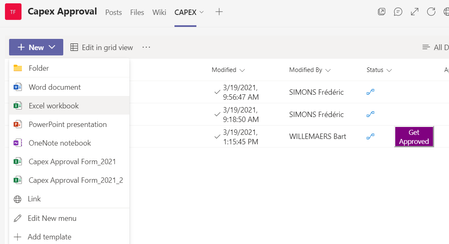
 Mar 19, 2021Its a well known, completely hidden in the documentation issue. Using the SharePoint tab makes everything in that tab read only. That includes the new button. It makes the SharePoint tab a bit useless if you ask me but the work around that Microsoft has told me in the past is to use the document library tab.
I wouldn't like to guess why your workflow is not working.

Fsim
Mar 22, 2021Copper Contributor
Hi Andrew,
thanks for your answer !
We found a workaround using the management of content types. We set up the template to be used here. Using the + new button now launches the Excel app on the PC. Good enough for me.
fun fact, our SP admin, don't have the issue. he can create a file using the +new button.
Regarding the flow, I'm using the "for a selected file" trigger. This imply a right tab pane to be shown where the user can fill in the parameters for the approval. this right pane don't shows up in the library tab. Moreover, the view is not the good one neither.
thanks for your answer !
We found a workaround using the management of content types. We set up the template to be used here. Using the + new button now launches the Excel app on the PC. Good enough for me.
fun fact, our SP admin, don't have the issue. he can create a file using the +new button.
Regarding the flow, I'm using the "for a selected file" trigger. This imply a right tab pane to be shown where the user can fill in the parameters for the approval. this right pane don't shows up in the library tab. Moreover, the view is not the good one neither.

TomVanRousselt
Apr 02, 2021Copper Contributor
Fsim I've found a working solution. If you go to the default Files tab and click the "+ add cloud storage" option, you can select any SharePoint library.
This library then gets added as a linked folder to the files tab, once you open the folder, you get the templates of that library under the new button, and these work.
- FsimApr 02, 2021Copper Contributor
TomVanRousselt
Hi Tom ! I did try that one. unfortunately it don't allow the right pane to shows up when the flow is triggered by the button.
this pane is the result of the first step of the flow. It works only with the solution I described.kr