Forum Discussion

Unable to restrict Microsoft 365 Groups In Teams
 Aug 12, 2021
Hi TonyRedmond, adam deltinger and jcgonzalezmartin
TonyRedmond I did contact MS Support and issue is resolved. Here is summary what happened:
- In Microsoft call, they were added a different user (Alex) to the group as a Member and Owner as well as. Removed my account (Aroh) from the RestrictM365Groups
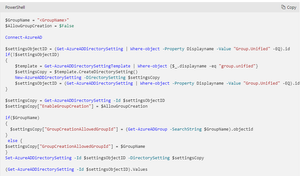
- After re-running the script
$GroupName = "RestrictM365Groups" $AllowGroupCreation = $False Connect-AzureAD $settingsObjectID = (Get-AzureADDirectorySetting | Where-object -Property Displayname -Value "Group.Unified" -EQ).id if(!$settingsObjectID) { $template = Get-AzureADDirectorySettingTemplate | Where-object {$_.displayname -eq "group.unified"} $settingsCopy = $template.CreateDirectorySetting() New-AzureADDirectorySetting -DirectorySetting $settingsCopy $settingsObjectID = (Get-AzureADDirectorySetting | Where-object -Property Displayname -Value "Group.Unified" -EQ).id } $settingsCopy = Get-AzureADDirectorySetting -Id $settingsObjectID $settingsCopy["EnableGroupCreation"] = $AllowGroupCreation if($GroupName) { $settingsCopy["GroupCreationAllowedGroupId"] = (Get-AzureADGroup -SearchString $GroupName).objectid } else { $settingsCopy["GroupCreationAllowedGroupId"] = $GroupName } Set-AzureADDirectorySetting -Id $settingsObjectID -DirectorySetting $settingsCopy (Get-AzureADDirectorySetting -Id $settingsObjectID).Values $Values = Get-AzureADDirectorySetting | ?{$_.DisplayName -eq "Group.Unified"} $GroupId = $Values.Values |?{$_.Name -eq "GroupCreationAllowedGroupId" } | Select -ExpandProperty Value Write-Host ("The name of the group defined by policy to control group creation is {0} and its object identifier is {1}" -f (Get-AzureADGroup -ObjectId $GroupId).DisplayName, $GroupId) Get-AzureADGroupMember -ObjectId $GroupId
and waiting a moment, the settings seemed to be working correctly.- The issue was, that I was owner of the group but there was no member for the RestrictM365Groups security group.
- After adding my name in both in Owner and Member
- I can create teams with my account
- Other users cannot create Teams
The Microsoft 365 Groups settings at Azure portal has to be turned off.
Thanks a lot for helping and providing your help!
- In Microsoft call, they were added a different user (Alex) to the group as a Member and Owner as well as. Removed my account (Aroh) from the RestrictM365Groups

aarohbits Given that you appear to be following the guidelines in https://docs.microsoft.com/en-us/microsoft-365/solutions/manage-creation-of-groups?view=o365-worldwide, why don't you log a call with Microsoft support and have them look at your tenant? No one here (except you) can sign into your tenant to check the settings, but Microsoft support can... and an extra set of eyes is often useful when looking for something small that's getting in the way.
Hi TonyRedmond, adam deltinger and jcgonzalezmartin
TonyRedmond I did contact MS Support and issue is resolved. Here is summary what happened:
- In Microsoft call, they were added a different user (Alex) to the group as a Member and Owner as well as. Removed my account (Aroh) from the RestrictM365Groups
- After re-running the script
$GroupName = "RestrictM365Groups"
$AllowGroupCreation = $False
Connect-AzureAD
$settingsObjectID = (Get-AzureADDirectorySetting | Where-object -Property Displayname -Value "Group.Unified" -EQ).id
if(!$settingsObjectID)
{
$template = Get-AzureADDirectorySettingTemplate | Where-object {$_.displayname -eq "group.unified"}
$settingsCopy = $template.CreateDirectorySetting()
New-AzureADDirectorySetting -DirectorySetting $settingsCopy
$settingsObjectID = (Get-AzureADDirectorySetting | Where-object -Property Displayname -Value "Group.Unified" -EQ).id
}
$settingsCopy = Get-AzureADDirectorySetting -Id $settingsObjectID
$settingsCopy["EnableGroupCreation"] = $AllowGroupCreation
if($GroupName)
{
$settingsCopy["GroupCreationAllowedGroupId"] = (Get-AzureADGroup -SearchString $GroupName).objectid
}
else {
$settingsCopy["GroupCreationAllowedGroupId"] = $GroupName
}
Set-AzureADDirectorySetting -Id $settingsObjectID -DirectorySetting $settingsCopy
(Get-AzureADDirectorySetting -Id $settingsObjectID).Values
$Values = Get-AzureADDirectorySetting | ?{$_.DisplayName -eq "Group.Unified"}
$GroupId = $Values.Values |?{$_.Name -eq "GroupCreationAllowedGroupId" } | Select -ExpandProperty Value
Write-Host ("The name of the group defined by policy to control group creation is {0} and its object identifier is {1}" -f (Get-AzureADGroup -ObjectId $GroupId).DisplayName, $GroupId)
Get-AzureADGroupMember -ObjectId $GroupId
and waiting a moment, the settings seemed to be working correctly.
- The issue was, that I was owner of the group but there was no member for the RestrictM365Groups security group.
- After adding my name in both in Owner and Member
- I can create teams with my account
- Other users cannot create Teams
The Microsoft 365 Groups settings at Azure portal has to be turned off.
Thanks a lot for helping and providing your help!
- Aug 12, 2021Classic
- TonyRedmondAug 12, 2021MVPThis makes sense. It's a common mistake inside Microsoft 365 to assume that just because you own a group, you have the rights enjoyed by the membership of the group (access to a Planner plan is another example). When you think about it, a clear demarcation exists because group ownership and membership for a good reason (owners take care of management, members do what they need to do with resources they can access through their membership). Apps like Teams read the Azure AD policy and find that group creation control is enabled and a group id exists. The app reads the membership list and applies the block.
Maybe the Office 365 for IT Pros eBook would help you navigate some of the challenges of tenant management. It's available at https://o365itpros.gumroad.com/l/O365IT (gratuitous ad) - Aug 12, 2021The joys of Groups Memberships that are even difficult to remember for Microsoft itself

