Forum Discussion

aarohbits
Aug 09, 2021MCT
Unable to restrict Microsoft 365 Groups In Teams
Hi All, I have a client’s requirement I had to restrict M365 groups and only selected users can create Teams. I have followed the Microsoft’s step to restrict via PowerShell Manage who can c...
 Aug 12, 2021
Hi TonyRedmond, adam deltinger and jcgonzalezmartin
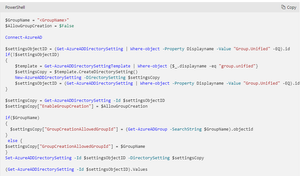
TonyRedmond I did contact MS Support and issue is resolved. Here is summary what happened:
- In Microsoft call, they were added a different user (Alex) to the group as a Member and Owner as well as. Removed my account (Aroh) from the RestrictM365Groups
- After re-running the script
$GroupName = "RestrictM365Groups" $AllowGroupCreation = $False Connect-AzureAD $settingsObjectID = (Get-AzureADDirectorySetting | Where-object -Property Displayname -Value "Group.Unified" -EQ).id if(!$settingsObjectID) { $template = Get-AzureADDirectorySettingTemplate | Where-object {$_.displayname -eq "group.unified"} $settingsCopy = $template.CreateDirectorySetting() New-AzureADDirectorySetting -DirectorySetting $settingsCopy $settingsObjectID = (Get-AzureADDirectorySetting | Where-object -Property Displayname -Value "Group.Unified" -EQ).id } $settingsCopy = Get-AzureADDirectorySetting -Id $settingsObjectID $settingsCopy["EnableGroupCreation"] = $AllowGroupCreation if($GroupName) { $settingsCopy["GroupCreationAllowedGroupId"] = (Get-AzureADGroup -SearchString $GroupName).objectid } else { $settingsCopy["GroupCreationAllowedGroupId"] = $GroupName } Set-AzureADDirectorySetting -Id $settingsObjectID -DirectorySetting $settingsCopy (Get-AzureADDirectorySetting -Id $settingsObjectID).Values $Values = Get-AzureADDirectorySetting | ?{$_.DisplayName -eq "Group.Unified"} $GroupId = $Values.Values |?{$_.Name -eq "GroupCreationAllowedGroupId" } | Select -ExpandProperty Value Write-Host ("The name of the group defined by policy to control group creation is {0} and its object identifier is {1}" -f (Get-AzureADGroup -ObjectId $GroupId).DisplayName, $GroupId) Get-AzureADGroupMember -ObjectId $GroupId
and waiting a moment, the settings seemed to be working correctly.- The issue was, that I was owner of the group but there was no member for the RestrictM365Groups security group.
- After adding my name in both in Owner and Member
- I can create teams with my account
- Other users cannot create Teams
The Microsoft 365 Groups settings at Azure portal has to be turned off.
Thanks a lot for helping and providing your help!
- In Microsoft call, they were added a different user (Alex) to the group as a Member and Owner as well as. Removed my account (Aroh) from the RestrictM365Groups

Aug 09, 2021
Out of curiosity: Do you have Azure AD Premium licenses assigned to the users that belong to your security group?
aarohbits
Aug 09, 2021MCT
Thanks for your reply jcgonzalezmartin
- Does M365 Group Restriction require AAD P1 license? I guess, its only for Naming, Blocked and Group Expiration, isn't it? TonyRedmond ..could you please advice on that?
- But my account does has AAD P1 license.
- TonyRedmondAug 09, 2021MVPGroup creation control requires Azure AD Premium P1, but as this requirement is not enforced, I don't think it is the problem. It's more likely the disablement of Microsoft 365 Groups for the tenant.
- aarohbitsAug 09, 2021MCT
Thanks a million TonyRedmond , I guess I have to turn on Microsoft 365 Groups and it should resolve the problem ...
- aarohbitsAug 09, 2021MCT
jcgonzalezmartin adam deltinger TonyRedmond
- Testing it but I cant create Teams. Steps I followed:
1) M365 groups is Enabled at the M365 Admin Center. - At Azure Portal, Microsoft 365 Groups is also turned on.
- PowerShell has been executed with my account which has AAD P1 license
- Still with my account which is in RestrictedM365Group security group, I cant create Team
Any suggestions please?
- Testing it but I cant create Teams. Steps I followed:
