Forum Discussion

How to COMPLETELY delete / unistall Teams
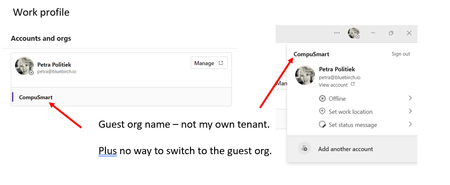

ErikG1970 No unfortunately no solution. Apparently the settings are so deeply rooted I can't get rid of them. I even left the organisation I was quest off to see if I could log in to the new version. This worked. However the minute I re-joined the organisation the problem returned. I've now created a new windows profile since there is no other solution.
If you manage to find a solution please so let us know.

Hi BB-PP,
I've had similar issue recently and was under the impression Team cache only stores in the below locations:
%appdata%\Microsoft\Teams
%localappdata%\Microsoft\Teams
In order to resolve the issue I needed to remove the Edge & Chrome cache also ( no idea whats stored )
After uninstalling Teams and clearing the cache, also clear Edge & Chrome data:
Chrome locations:
\Google\Chrome\User Data\Default\Cache
\Google\Chrome\User Data\Default\Cookies
\Google\Chrome\User Data\Default\Web Data
You can clear Edge by using the below cmd:
RunDll32.exe InetCpl.cpl, ClearMyTracksByProcess 8
#(This part of the command is designed to clear temporary internet files and website files.)
RunDll32.exe InetCpl.cpl, ClearMyTracksByProcess 2
#(This part of the command is designed to clear cookies.)
Then remove any remaining credentials from credential manager and make sure to restart the device before re-installing
Hope this is helpful, worked for me