Forum Discussion

CWPSAdmin-PN
May 04, 2022Copper Contributor
Poly C60 Meeting Room Interface Change
The C60 phone screen has suddenly changed. The room accounts are licensed with Microsoft Teams Room Standard licenses and they used to look like the below: And now they look lik...
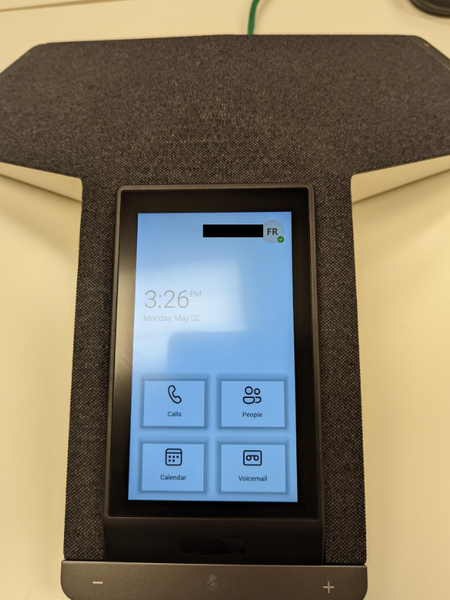
- May 04, 2022
Hi, This is a planned UI update for portrait conference room phones. I do know about this via a TAP release and may not have been announced publicly yet

Eric Marsi
May 04, 2022MVP
Hi, This is a planned UI update for portrait conference room phones. I do know about this via a TAP release and may not have been announced publicly yet

CWPSAdmin-PN
May 05, 2022Copper Contributor
Is there a way to roll this back to the original UI?
 UCVerseMay 15, 2022Copper Contributor
CWPSAdmin-PN Actually you can but it is painful if you have lots of them, you need to roll back to an earlier firmware version and do a factory reset. The firmware version will use the Teams app that comes with the firmware.
- Eric MarsiMay 05, 2022MVPUnfortunately no. This is the UI going forward
- UCVerseMay 16, 2022Copper ContributorYes, there is a way but you will likely not be able to go to the same exact Teams app version and you have to do a factory reset as well. If you want to change the appearance you can create Teams IPPhone policy, and assign it UserSignIn Mode which is closest to the appearance of the old GUI but will have security issues as it doesn't have the user restriction that comes with the MeetingSignIn mode.
'UserSignIn: Enables the individual user's Teams experience on the phone'
'CommonAreaPhoneSignIn: Enables a Common Area Phone experience on the phone'
'MeetingSignIn: Enables the meeting/conference room experience on the phone'