Forum Discussion

Participants not showing up on camera BUT camera shows for others
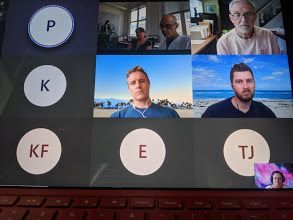
- Aug 04, 2021
Alan_Denness P_Gascoyne Yair_Azriel Tamara100 and all: This is the response from the meetings features team:
-
If you have issues with video in Teams meetings, please try to update Teams to the latest version and ensure that incoming video is not turned off in your Teams client. (You can check it via three dots menu in meeting toolbar > Turn incoming video off/on). After you install the latest Teams updates, please restart your computer. If you still experience the video issues, please ask your IT manager to open a support case or call Microsoft using the support line you were given.
Other options for business subscription admins are listed here:
https://support.serviceshub.microsoft.com/supportforbusiness/create
Additional tech support is available at support.microsoft.com or Answers.microsoft.com
-


This is happening to me too. Teams just suddenly stopped showing people. The only time I can see everyone's faces is if someone is sharing their screen. Then I can see people at the bottom of the screen. I have no problems with bandwidth. I've tried everything that others have tried. I'm guessing this is a bigger issue.

SWillettI'm having exactly the same issue? did you solve it already?
 rwinchester2000Mar 09, 2021Tin Contributor
PCosta340 Try what Mark_Stamatiades suggests (above). I did a simple delete / re-install and it worked.
 David-DMar 09, 2021Copper ContributorI have uninstalled/re-installed. I haven’t had a more than 2 participant meeting so can’t say if fixed. Will update when on a bigger call.