Forum Discussion

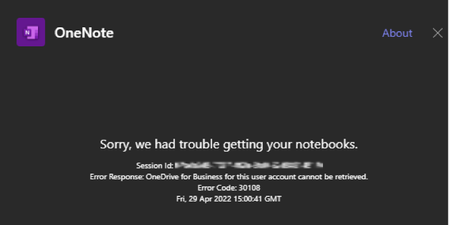
OneNote error 30108 in Teams
 May 04, 2022
I ended up opening a Service Request ticket in our M365 portal.
After working with a Microsoft support engineer on the issue, collecting logs, screenshots, and recordings of the behavior, this morning the issue is resolved.
I am waiting to hear back from the support agent on what the fix was from their side. I will update this thread when I have more info.Update:
I received the official resolution from the Microsoft Agent.
"the issue was just a one off (more like a glitch in some tenants) , This support line is a break and fix team and do not provide Root Cause Analysis on issues."

OLM_Dan Past entries in this community indicate that the issue resolved itself on its own, but I also found this old post from answers.microsoft.com: https://answers.microsoft.com/en-us/msoffice/forum/all/onenote-importer-error-30108/6adf3165-90ac-4f42-9c45-3ff048363329#:~:text=30108%20error%20code%20indicates%20The%20user%27s%20OneDrive%20for,for%20Business%20account%20must%20be%20setup%20and%20accessible.
- OLM_DanApr 29, 2022Brass Contributor
Thanks for the replay.
Yes, I did also find some similar post from others (not all exactly the same).https://answers.microsoft.com/en-us/msteams/forum/all/add-a-tab-with-ms-onenote-error-code-30108/22c1640e-663d-4f2a-be55-68d6339e5f3c
andOne thread did say it resolved "magically", back in Aug of 2021.
The other points to OneDrive not being setup for a user.
I can confirm my OneDrive, as well as others, have been setup and working for a while.
I did follow the step suggested in one post anyhow and logged into my OneDrive drive from the web app, and then to my OneNote from the WebApp.
When I try to create a new Notebook in OneNote, I get a message that my OneDrive is not set up.
"Your OneDrive is not set up
Before you can use OneNote, first you need to go set up your OneDrive."I clearly have OneDrive setup and even other OneNote Notebooks saved to OneDrive already.
It would be great if it resolved itself on its own, but that's not a great answer to give my customers.
Update:
Just wanted to add, other Web Apps like Word, Excel, and PowerPoint have not issues saving new documents to OneDrive.
- OLM_DanMay 04, 2022Brass Contributor
I ended up opening a Service Request ticket in our M365 portal.
After working with a Microsoft support engineer on the issue, collecting logs, screenshots, and recordings of the behavior, this morning the issue is resolved.
I am waiting to hear back from the support agent on what the fix was from their side. I will update this thread when I have more info.Update:
I received the official resolution from the Microsoft Agent.
"the issue was just a one off (more like a glitch in some tenants) , This support line is a break and fix team and do not provide Root Cause Analysis on issues." giscowboyFeb 24, 2023Copper ContributorThanks for sharing this. We are having the exact same issue right now, just like the screenshots above. I guess we'll just cross our fingers and hope the issue resolves itself soon. It's good to have hope things will get better.