Forum Discussion

Noffe69
Oct 04, 2021Copper Contributor
Multifactor authentication not working as it should
We're using Office 365 as our work emails and I've activated Multifactor authentication on my account. It's allowed to install the programs on up to 5 different computers and I've only need for 2...
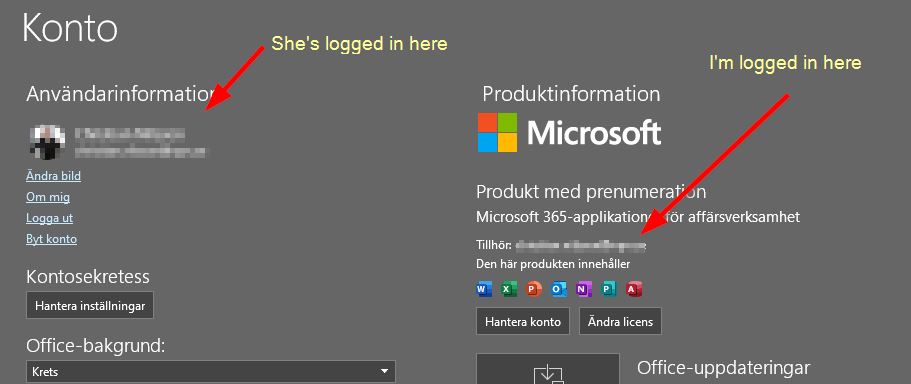

Oct 04, 2021
Hello, once MFA has been satisfied you will not get another prompt until your 'session lifetime' expires and easily explained the default is a rolling window of 90 days.
It sounds to me as if your account is added under the W10 account settings on her computer making it the primary account as Teams defaults to domain-joined accounts.
It sounds to me as if your account is added under the W10 account settings on her computer making it the primary account as Teams defaults to domain-joined accounts.

Noffe69
Oct 04, 2021Copper Contributor
Which mean despite she's logged in as herself on the computer and using her account already in Teams when she's using a Teams meeting link it say "I don't give sh... about what she want", she's using a personal account and since I have here an account that's a work account I'll use that despite the fact it isn't used to anything else than activating Office.
I'll say that an BIG bug in Teams handling of accounts.
Despite if I remove my account from W10 account settings then the Office activation also stops working.
- Oct 04, 2021It's because you're not using the correct licensing. You cannot share a Business subscription this way, you'll need "Family" for up to six people (I think it is). As for the above, when your account is being added there the laptop is added as 'Azure AD registered' and part of your business org. Hence, using the Azure AD WAM plugin to get a Primary Refresh Token (PRT). The PRT uses refresh tokens and access tokens for enabling SSO (single sign-on) so perhaps you now understand that the scenario isn't optimal and Teams literally trying to do whatever it can to use your account (as well as other apps).