Forum Discussion

Ryan_71590
Jul 22, 2021Copper Contributor
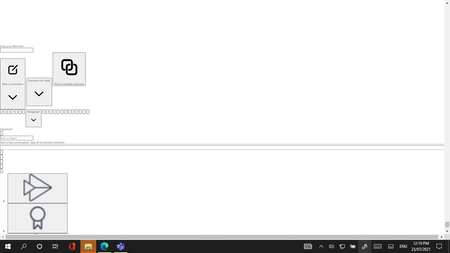
MS Teams showing big display icons
Hello, can someone help me fix this MS Teams issue... When I open Teams it only displays large icons of its settings, search buttons and etc. Kindly see the screenshot attached. This is functioning w...
- Jul 23, 2021Hi,
Start with clearing Teams cache.
1. Fully quit Microsoft Teams and ensure it’s not still running in the toolbar at the bottom right of Windows.
2. Navigate to %appdata%/Microsoft/Teams in a File Window.
3. Select everything in the folder.
4. Delete everything.
5. Open Teams and wait for it to download required files.
https://sysadmin-central.com/2021/04/28/how-to-clear-the-microsoft-teams-cache/

LinusCansby
Jul 23, 2021MVP
Hi,
Start with clearing Teams cache.
1. Fully quit Microsoft Teams and ensure it’s not still running in the toolbar at the bottom right of Windows.
2. Navigate to %appdata%/Microsoft/Teams in a File Window.
3. Select everything in the folder.
4. Delete everything.
5. Open Teams and wait for it to download required files.
https://sysadmin-central.com/2021/04/28/how-to-clear-the-microsoft-teams-cache/
Start with clearing Teams cache.
1. Fully quit Microsoft Teams and ensure it’s not still running in the toolbar at the bottom right of Windows.
2. Navigate to %appdata%/Microsoft/Teams in a File Window.
3. Select everything in the folder.
4. Delete everything.
5. Open Teams and wait for it to download required files.
https://sysadmin-central.com/2021/04/28/how-to-clear-the-microsoft-teams-cache/

Ryan_71590
Jul 23, 2021Copper Contributor
LinusCansby Thank you so much... It works.