Forum Discussion

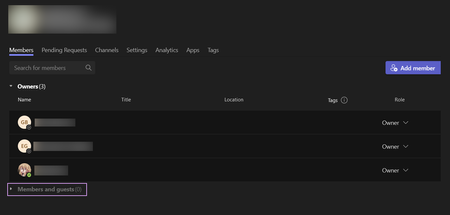
MS Teams member/guest suddenly not appearing.
- Mar 03, 2024
Hi ,
there is a global issue "Some users who are team owners may see an incorrect member and guest count for some teams within Microsoft Teams" - TM709914 - reported in Microsoft 365 Admin center (please see the screenshot).Next update from Microsoft regarding this issue tomorrow, March the 5th, 2024.
In the meantime, you can use Admin account to check the members and guests, because Admins can view the correct counts through the Microsoft Teams admin center.
You can (if you are an Microsoft 365 Admin) click on the "Are you experiencing this issue?" and report the issue to Microsoft.
Please click Mark as Best Response & Like if my post helped you to solve your issue.
This will help others to find the correct solution easily. It also closes the item.If the post was useful in other ways, please consider giving it Like.
Kindest regards,
Leon Pavesic
(LinkedIn)
(Twitter)

Hi ,
there is a global issue "Some users who are team owners may see an incorrect member and guest count for some teams within Microsoft Teams" - TM709914 - reported in Microsoft 365 Admin center (please see the screenshot).
Next update from Microsoft regarding this issue tomorrow, March the 5th, 2024.
In the meantime, you can use Admin account to check the members and guests, because Admins can view the correct counts through the Microsoft Teams admin center.
You can (if you are an Microsoft 365 Admin) click on the "Are you experiencing this issue?" and report the issue to Microsoft.
Please click Mark as Best Response & Like if my post helped you to solve your issue.
This will help others to find the correct solution easily. It also closes the item.
If the post was useful in other ways, please consider giving it Like.
Kindest regards,
Leon Pavesic
(LinkedIn)
(Twitter)

LeonPavesic Is there a status update on the correction for this issue? It is almost a week after March 5th and the problem still persists. Not all of us are administrators and can use the suggested work-around.
I determined a crude work-around. Typing an "*" in the Search for Members box brings up a list of members.