Forum Discussion

Missing 'Join' Button in MS Teams for Meetings Scheduled from a Group Calendar??
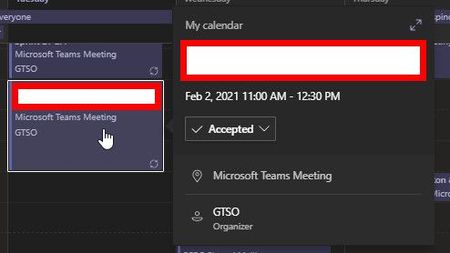

Bump for this issue, I'm experiencing the same thing, with no leads
- amandaabateJun 08, 2021Copper Contributor
amandaabate So here's what fixed my issue:
Set up:
- Create meetings on the Group Calendar from the desktop app (o365 version)
- Set as Teams Meeting using outlook add-on
- Do not invite attendees
- Save & Close
- Later - add attendees and send invites
Now, people have the meeting on their calendars, hosted by the Group calendar, but from the Teams app, you don't have a join button or the option to chat.
This was stemming from a sync error with the event in the web app. If you open the event inside the web calendar viewer for the Group, the checkbox to enable a Teams meeting was not set, despite the Teams links existing in the description (implying it already was a Teams meeting). Once that is checked and the event is updated, all is well in Teams.
- ThereseSolimenoJun 08, 2021Former Employee
There is a past post in this community that offers a "best solution": Re: Missing "Join" button in Microsoft Teams calendar for meetings from external Users - Microsoft Tech Community
- amandaabateJun 08, 2021Copper Contributor
ThereseSolimeno that didn't solve the issue. My time and timezone are set automatically, and I can't change that setting since it's managed by my organization.
The meeting is owned by a group, but it was put into the calendar by me. I'm listed as an attendee and I'm trying to join the meeting from my teams account, but there is no Join button (nor an option to chat with participants). Additionally - other members who are required attendees do have a join button
