Forum Discussion

Manage location sharing in Microsoft Teams
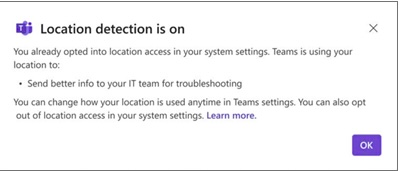
In progress of testing Windows 24H2 and found that the location service is default to "on" and that was default "off" in our earlier windows installation. It seems that Microsoft Teams default to "allow/on" and that causes Microsoft Teams application to launch a pop up to the team users. (see pic")
Some information is available here
https://support.microsoft.com/en-us/office/manage-location-sharing-in-microsoft-teams-583dd649-87fc-4b23-aed6-f4e2279297f9#id0ebbd=windows
But still hard to understand why it seems Teams on OS level default to "Allow/on" anyone seen this and taken any action to prevent Teams to through the pop up to all Teams users.
Strange thing is we've installed Teams 3 times on a test machine and first 2 times is was "Allowed" now the 3rd time it's registry value is "prompt".
HKEY_CURRENT_USER\Software\Microsoft\Windows\CurrentVersion\CapabilityAccessManager\ConsentStore\location\MSTeams_8wekyb3d8bbwe
strange a clean installation can differ. Anyone know how ti should work?
I've tried to find a way through Teams policy to supress the pop-up but wouldn't find any policy or settings that manage this.
1 Reply
 Matt-Apps4RentIron Contributor
Teams doesn't have a policy to control the location pop-up directly. It relies on Windows location settings, and those can vary based on OS version, install method, or user profile state.